This article gives details of features and fixes included in each release of the software. To see which version you currently have installed see this article HERE
For older release notes click HERE (Jan 2024-Dec 2024)
For older release notes click HERE (Jan 2025-Dec 2025)
RELEASE NOTES: Jan-Dec 2026
For earlier releases please use the links above to see the features release during the relevant year.
IMPORTANT INFO: Accessing your database from abroad If you are an Influence direct customer using a database in our hosted data centres, then please be aware that enhanced security is in place. In order to protect your data, when accessing from many non-UK locations, especially outside Europe, you will need to use a VPN that provides a UK-Based IP address. This is to help protect your data from hackers and other online threats. Typical VPN providers include Norton, NORD VPN, Express VPN, Cyberghost, etc. Influence do not endorse or recommend any specific VPN, but there are plenty of choices available online. Think about which VPN you choose - Some VPNs (like Norton) can get blocked by governments such as UAE or QATAR - Others (such as NORD, or Surfshark) are better in these countries. (NB: Some mainland European locations are allowed for direct access, but a VPN is always preferred. Always abide by local laws when using a VPN as this may be illegal from some locations.) |
Version History (Click an item to jump to that section)
INDEX
TABLE OF CONTENTS
- Next Release: -> TBC
- Release: Ver 1.00.26.247 (04/09/2026)
- Filter Compliance List when using Drag/Drop to easily find items
- IP Address Logging for Login / Logout Activity
- Booking confirmation templates can now contain information "First time Only"
- Candidate Feedback scores can now be shown on the PLANNER
- Candidate Searching (from Vacancy) - Distance mode/All Offices by default
- Contact Drop-down from Timesheet entry can now show 'Job Description'
- Bookings on Planner can show "Time Period" in 1st Line
- Miscellaneous/Internal Developments
- Release: Ver 1.00.26.211 (30/07/2026)
- Ability to suspend compliance for a worker at a specific Client/Branch
- New User Access control to LOCK [Compliance] tab for certain Statuses.
- Mailchimp Integration- Link Groups to Mailchimp Audience/Tags
- Show Additional Info for "Timesheet" contacts in Timesheet Entry
- Irish "Stamp 2" student - restricted hours limit
- Reference Chasing - New style to chase for references after original manual send
- Close to AWR weeks warning when making a booking
- Improved organisation for IQUERY reports
- Find Vacancies with bookings in date range
- Miscellaneous/Internal Developments
- Release: Ver 1.00.26.156 (05/06/2026)
- Release: Ver 1.00.26.135 (15/05/2026)
- User Access Control (UAC) to allow/prevent access to [Add Worker] button
- Filter Client bookings By SHIFT on [Booking] tab of client
- Improved Logging for Macro/Mailshots if 'Create Journal' is unticked
- Display 'Parent' company name on [Company] workbench
- New colour choice (orange) for Code Tables (e.g. Candidate Status, Client Status, etc)
- Bank Account Number - Format Validation
- Miscellaneous/Internal Developments
- Release: Ver 1.00.26.091 (01/04/2026)
- Release: Ver 1.00.26.044 (13/02/2026)
- UAC for Call Playback control
- Contact Status can now be set as "Locked" (Same as Candidate/Client Statuses)
- Select and Zip 'All' Compliance items
- PLANNER can now show "Last Worked Date" as a hover-tip
- Ability to email candidates with details of non-responsive Referees
- Ability to Sort bookings by "Candidate" - when sending Client confirmation emails
- Easier to MOVE contacts or links them to a new "Branch"
- Miscellaneous/Internal Developments
Next Release: -> TBC
Features
Add Availability according to a Schedule (e.g. 4on/4off, 3on/2off, etc.)
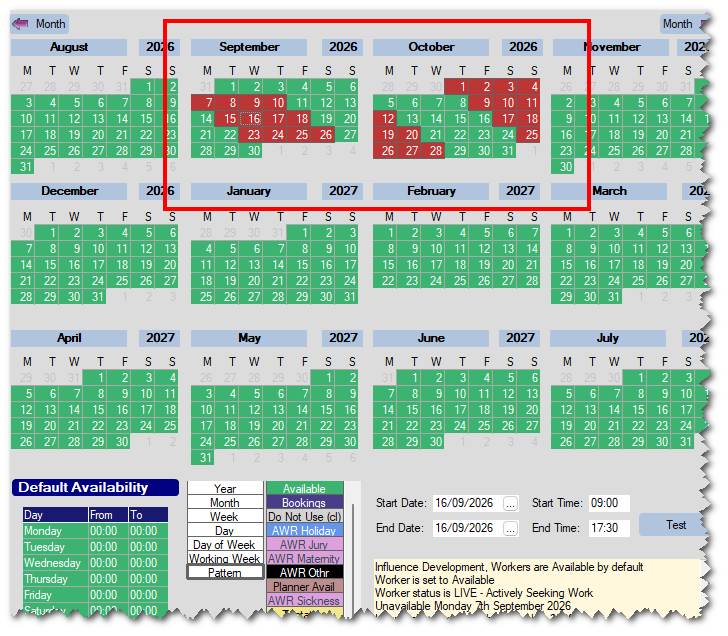
A new "PATTERN" option has been added to the candidate availability calendar. Using this you can now select an option and add it multiple times, according to a chosen pattern (e.g. 4xUnavailable / Skip 4 Days)
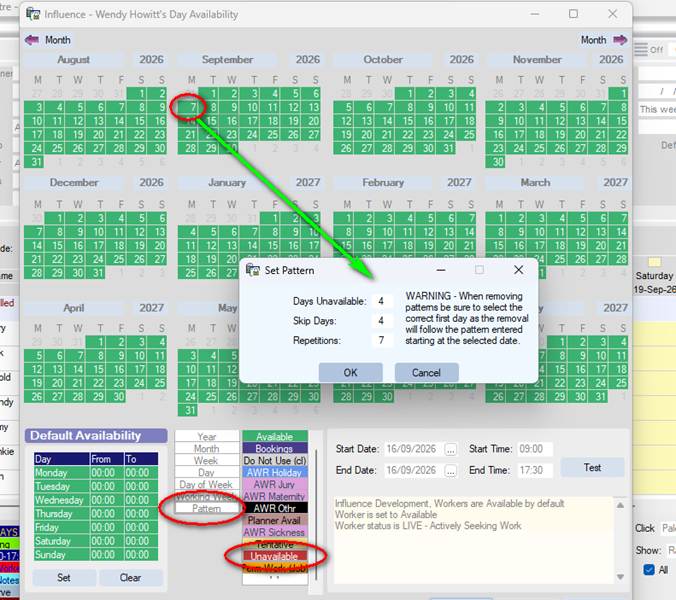
The result will be a whole series of entries added to their calendar. See below
Marker can be removed using the same [Pattern] option and then clicking on the "Start" of a pattern.
Set Default booking period for Client (Hourly/Daily)
This release introduces the ability to set the Default Booking Period for a client as Hourly or Daily. This can be done on the [Accounts] tab of the client, and affects BOOKINGS, RATES tab, and any TEMP Vacancies created for the client, By default they will be whatever is set on the [Accounts] tab of the client.
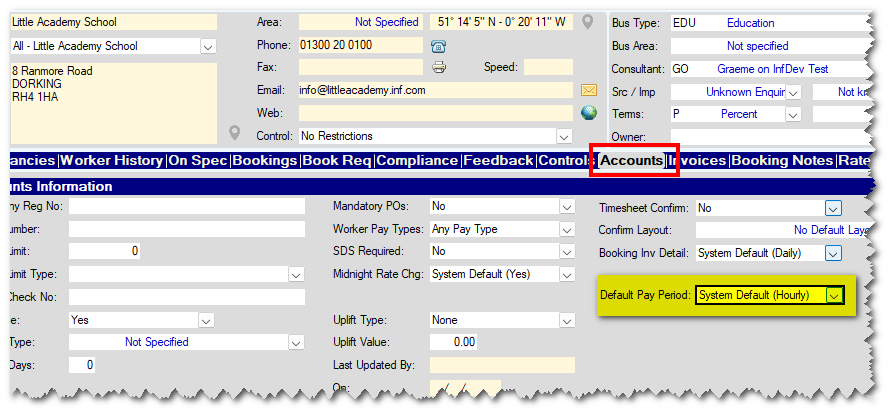
This new change affects: BOOKINGS, RATES, CONTROLS (tab on client) and any new TEMP vacancies created/added for this client. They will all open according to the default value set on the [Accounts] tab.
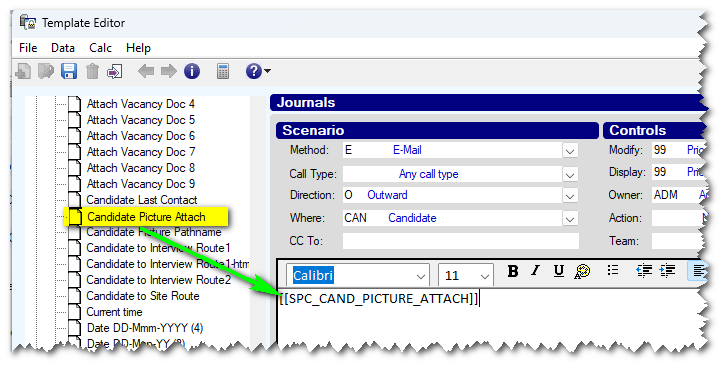
A new 'Attach Candidate Picture' field has been added for Journals
A new "Candidate Picture Attach" field has been added which can be used on email Journals. When selected it will attach the picture, as seen on the [Personal] tab of the candidate. This field has been specially written to work on Influence direct systems, where the database is hosted on a remote, cloud server.
Miscellaneous/Internal Developments
- When exporting TIMESHEET records to TEMPAID using the LONG (1754 length) format only, it is now possible to send over the sex of the worker in position 1669 of the REC??EMP.dat file.
The new feature is activated with parameter PAYROLLB, flag(57) - and the length of the export is controlled with PAYROLL INTEGER (31)
Example of Export file showing Sex (M/F) in position 1669

- New merge fields available for Templates. The fields can be found under the Calculated Booking Fields section at the left of the Template Editor.
Period (Hour/Day) - Will display the bookign period as either Hour or Day
Period Type - Will display the period type for the booking as either Hourly or Daily
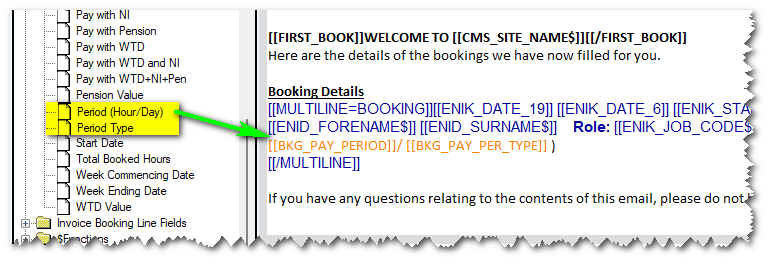
- New Merge fields made available via Template Maintenance
The [Catalogue] at the left now has Booking Type Description and Booking Type Short available as fields which can be added to the templates as merge fields.
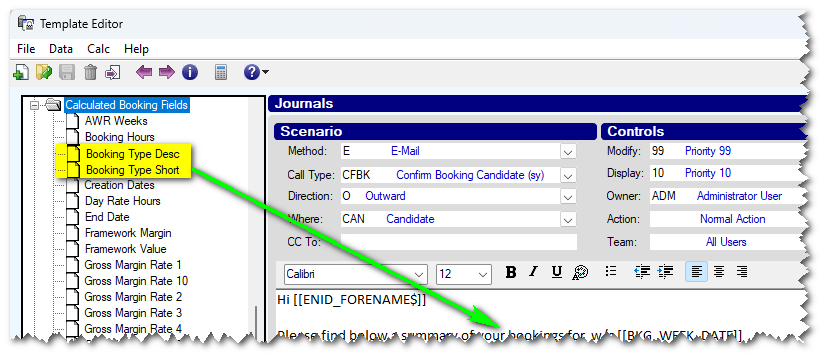
(Example: A booking type might have a description of "Booking" and a Short Type of "BKD" )
- Within Workflow Definitions, it is now possible to setup a workflow stage, so that it will send an (internal) email to the Match Owner (See below)
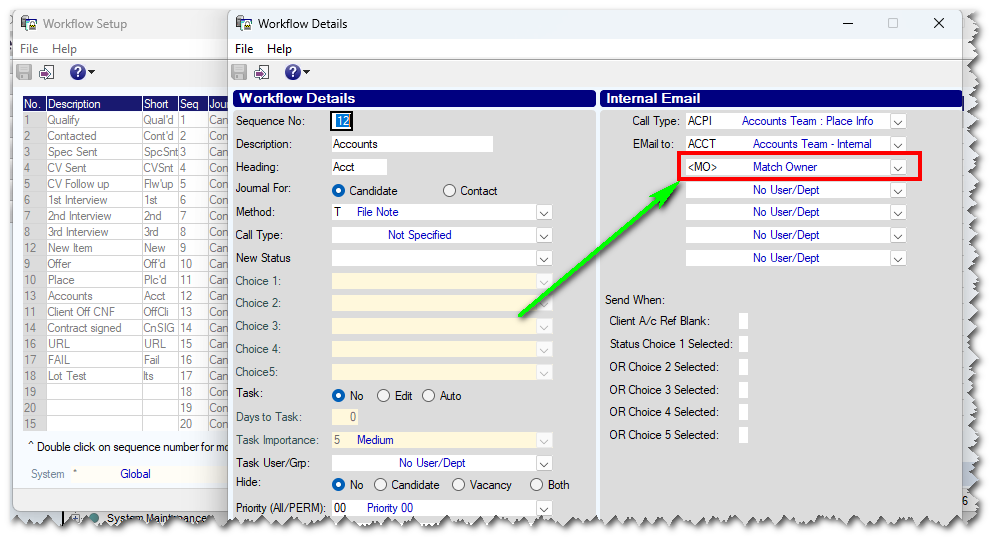
EXAMPLE: If you have created a workflow stage such as "Client Invoiced" then ticking this stage can automatically send an email to the consultant who is the Match Owner - perhaps to make them aware that their commission now becomes payable.
- New fields available for Custom TS Export reports. Some new fields have been made available for the Custom Timesheet Export reports. These fields are
Bug Fixes
- Fixed an issue - when exiting a contact record a "missing component" could occur.
- Fixed an issue when creating GROUPS directly from the SQL query tool. Groups are now created
- Fixed an issue that could cause the system to hang when sending a Client booking confirmation after running an attribute search from within the Booking Entry form. Client confirmations are now sent without issue.
Release: Ver 1.00.26.247 (04/09/2026)
Features
Filter Compliance List when using Drag/Drop to easily find items
When you drag/drop document onto the Compliance tab of a worker, you are presented with a list of compliance items.
It is now possible to FILTER that list to find the specific item you are after. Just type the detail of the item(s) you are trying to find and the list will be filtered.
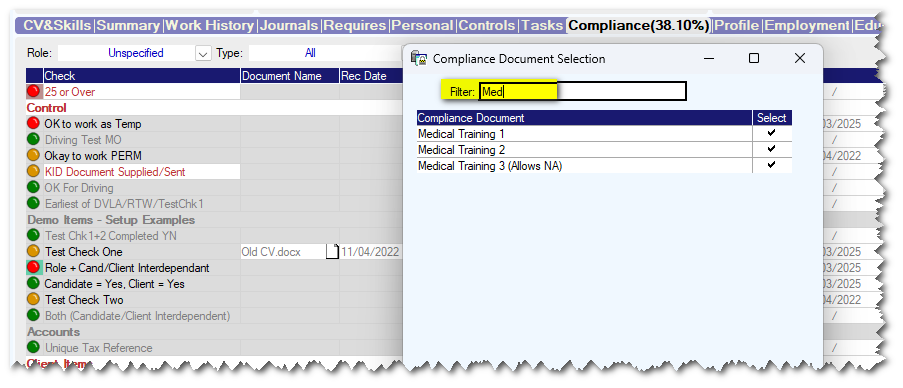
NB: You can also click the COLUMN HEADING [Compliance - Document ] to sort the list alphabetically A-Z or Z-A
IP Address Logging for Login / Logout Activity
From this release, the IP Address of anyone connecting to your Influence DIRECT database is recorded in the System Log.
If you filter this log to view LGIN/LGOF activity you can display the IP address of the User that was used at the time of the connection.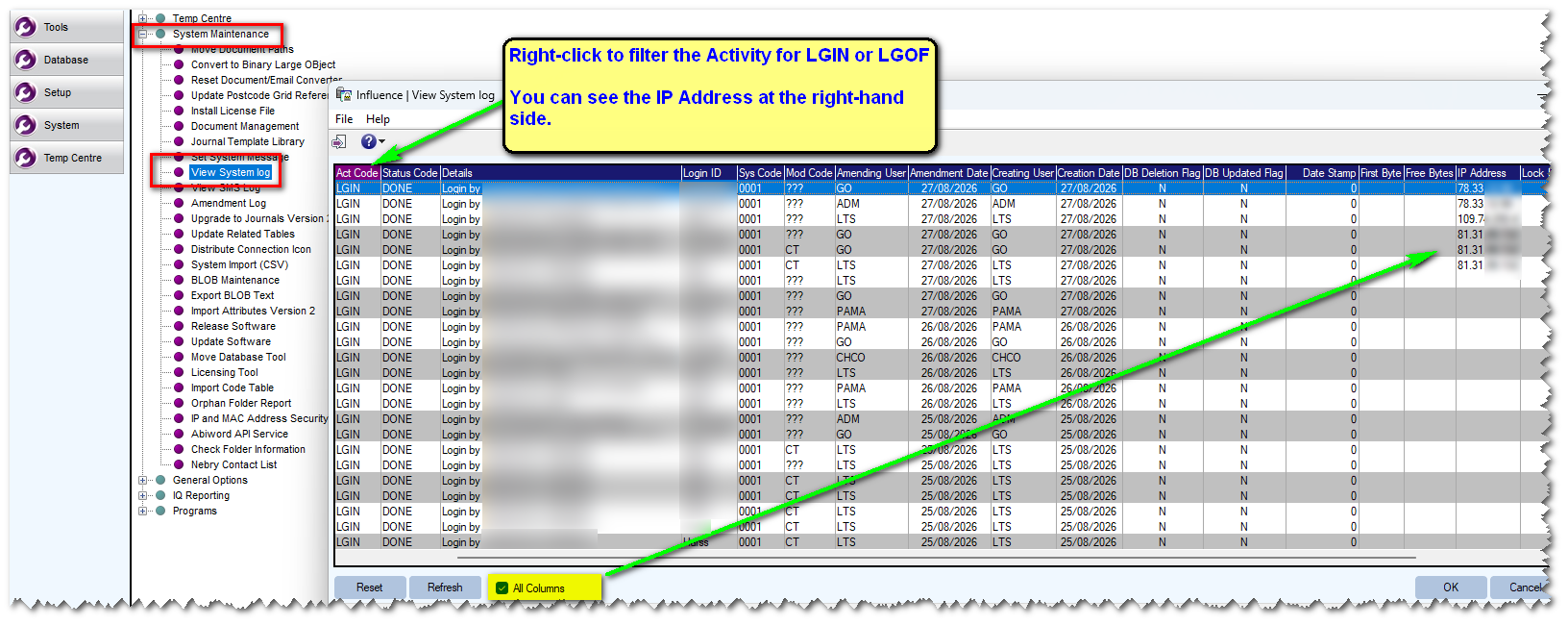
Booking confirmation templates can now contain information "First time Only"
A new merge field has been added which will allow you to display certain text or information only the "First Time" a candidate is booked to go to a site.
This is useful when you want to send things such as 'Sign in' information for their First Day on-site, but do not wish to send this for subsequent bookings. Any information wrapped in the new merge field [[FIRST_BOOK]] xxxxx [[/FIRST_BOOK]] will only be sent the First time the worker attends site.
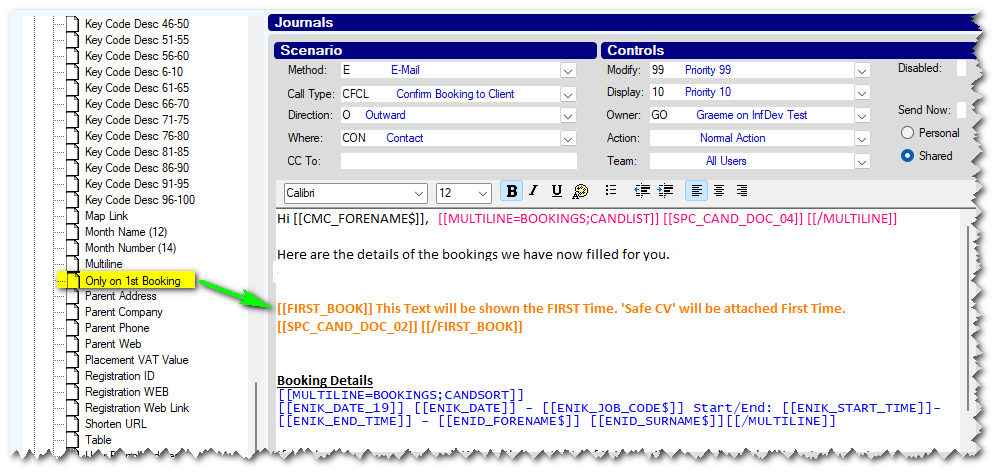
| NOTE: The feature ALSO allows a parameter so that it will send information the FIRST time for a specific ROLE (E.g. If they go as a Forklift driver, and then later as a Warehouse Operative) [[FIRST_BOOK=JOB]] xxx [[FIRST_BOOK]] |
For More information see our support article about MULTILINE MERGE Fields.
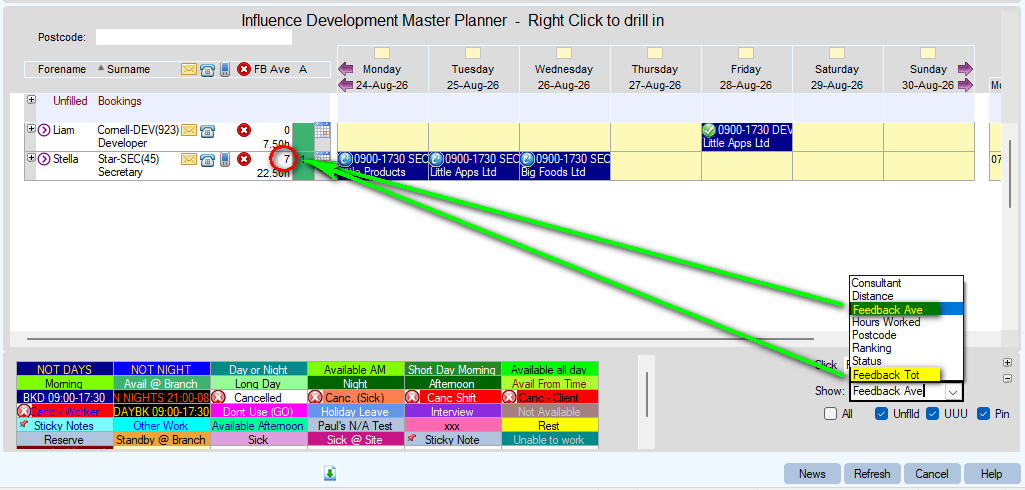
Candidate Feedback scores can now be shown on the PLANNER
A new feature has been added to allow users to show the FEEDBACK scores for a candidate on the planner. Using the drop-down at the bottom left, you can choose to display the Average feedback or the Total feedback score.
Candidate Searching (from Vacancy) - Distance mode/All Offices by default
In this release two new parameters have been introduced. These allow the system to be setup so that distance mode / All Offices [if you have a multi-office system] can be selected by default when opening a new candidate search from a vacancy.
See below
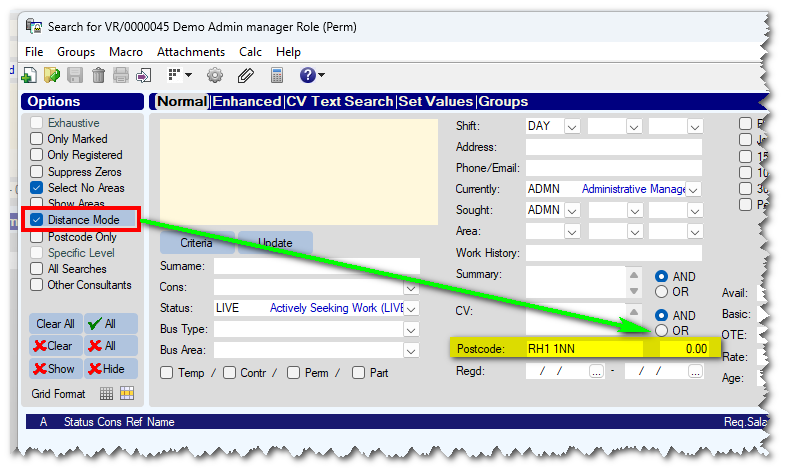
The parameters are:
RECB Flag (51) - Default Distance mode on Candidate Search (Y/N)
RECB Flag (52) - Default All Offices mode on Candidate Search (Y/N)
Contact Drop-down from Timesheet entry can now show 'Job Description'
From this release, the contact drop-down within timesheet entry can show the 'Job Descriotion' field from the contact
(Previously user could choose from ROLE Description, Phone, Mobile, DDI and 'Importance' )
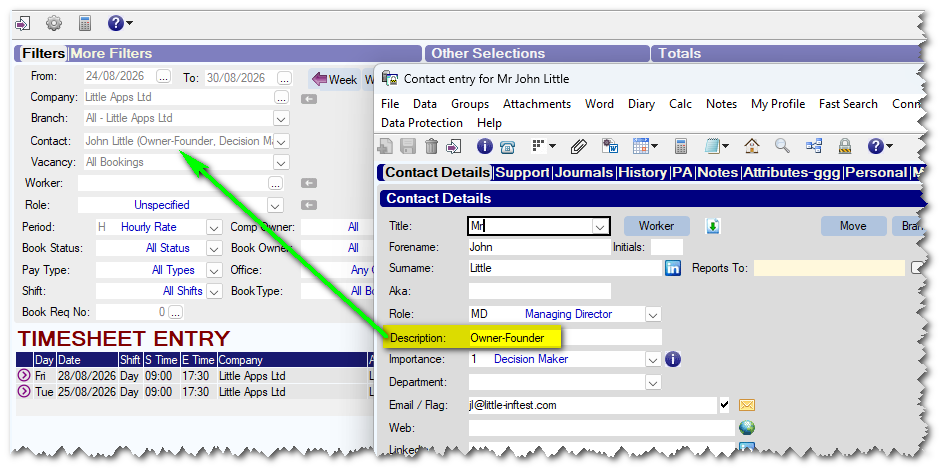
To show the Job Description as part of the Contact Drop-down, set parameter RECF Text 12 to contain X
e,g,. Setting the parameter to XPI would show Job Description (X), Telephone (P), Importance (I).
Bookings on Planner can show "Time Period" in 1st Line
It is now possible to show the period after the main booking details
e.g. 08:00-18:00 ADMT (H)
The (H) represents the fact this is an "Hourly" booking
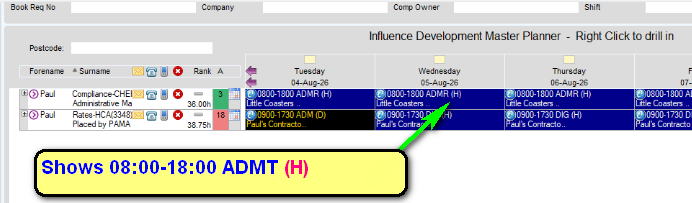
(NOTE: The same info about being HOURLY can also be seen by hovering over the booking and viewing the Hover tip.)
New feature is controlled with parameter PLANNER, FLAG(10) - can be set to Y to show the info, or F to show Full info (Will show (Hourly) rather than (H)
Miscellaneous/Internal Developments
- Added a new option within "Custom Timesheet Exports" to allow a report to be exported that excludes ZERO rates except for rates which are "Non-Hrs" (Unit Rates)
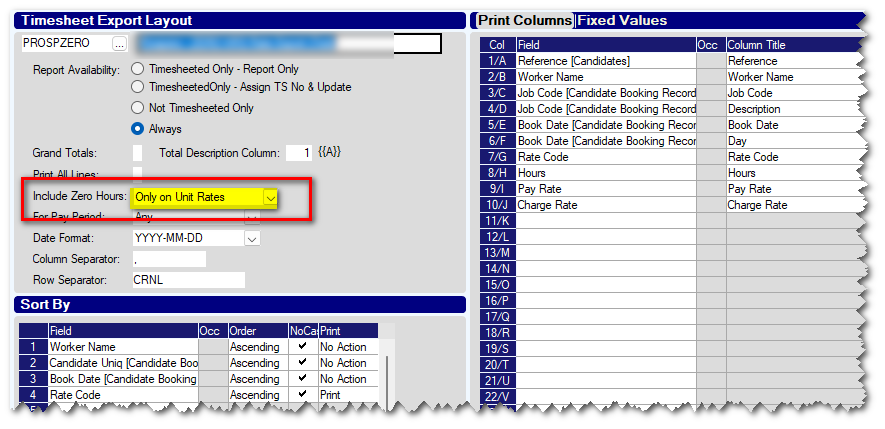
In the Example above it will only export Rates where hours have been included <OR> rates which are "Non-Hrs" rates, such as "Mileage"
- When merging Contacts the Source Contact's documents will appear in a separate folder within the 'Docs' tab of the Main Contact. The folder will be named using the Unique ID of the Source Contact record which was merged. Click here for more info.
Bug Fixes
- Fixed an issue which could cause compliance merge fields to not be resolved when called directly from candidate Journals.
- Increased length of hover-tip text for candidate compliance to prevent truncation of message.
- Fixed a bug which could cause Matches to be displayed twice on [MATCH] workbench if the UserID had been added to the same 'Team' Twice (User Profiles, Main Team + Other Team )
Release: Ver 1.00.26.211 (30/07/2026)
Features
Ability to suspend compliance for a worker at a specific Client/Branch
A new feature has been added to allow users to suspend compliance checks for a worker at a particular client/branch. This will allow a worker to be booked at specific clients - even if they are missing some MANDATORY compliance items.
On the [Work History] tab of a worker, users can now open the relevant 'Booking Match' and enter a compliance suspension date, relevant to that specific client/site.
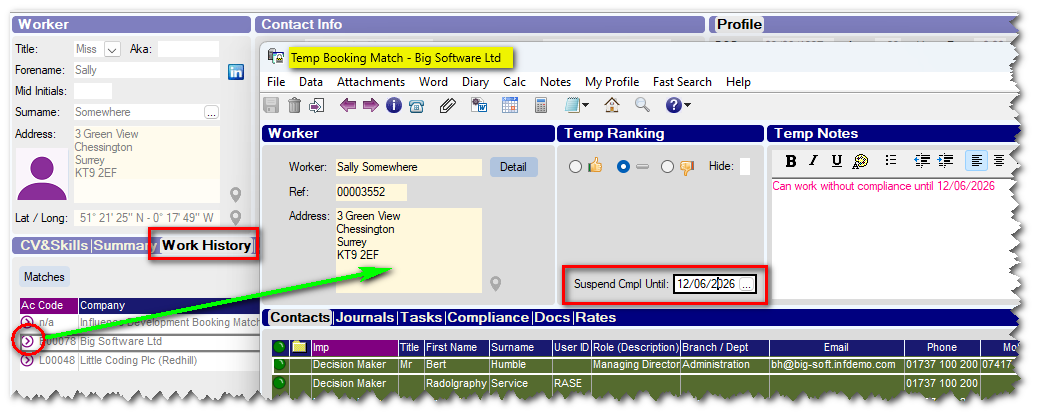
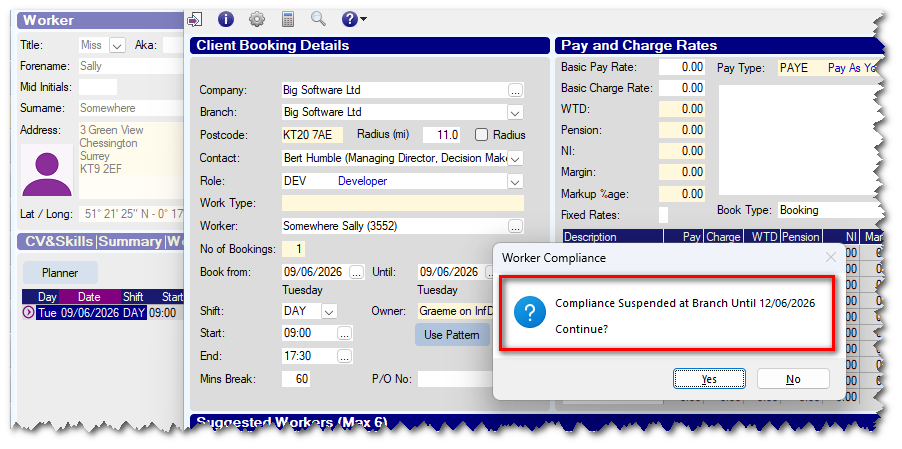
Once a compliance suspension date has been set ALL COMPLIANCE WARNINGS WILL BE IGNORED/SUPPRESSED when booking the worker to go to that specific site. During the booking process a pop-up message will be displayed to inform the user that compliance has been suspended at that site. (See below)
New User Access control to LOCK [Compliance] tab for certain Statuses.
A new feature has been introduced to allow control of which users are allowed to edit the [Compliance] tab of a worker, for certain statuses. The User Access Control CMPLSTATEDIT can be used to specify a list of users who are allowed to edit/amend the [Compliance] information *if* the candidate is at certain statuses.
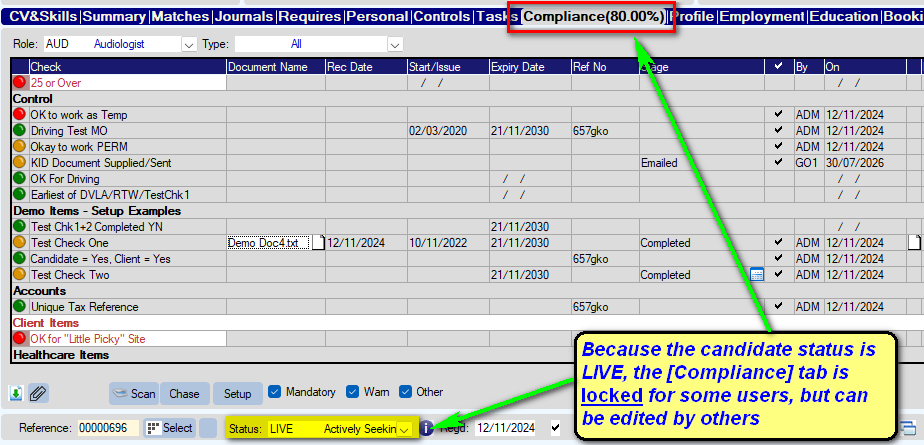
Example
If you have 3 users, Andy, Bert & Charlie, you might decide to set the system such that when a candidate is at a LIVE status, Andy & Bert cannot amend the candidate compliance (it is 'locked') but Charlie can edit their compliance (because he has been added to the UAC for CMPLSTATEDIT with 'Full Access'.
Mailchimp Integration- Link Groups to Mailchimp Audience/Tags
This release includes the ability to link GROUPS to Mailchimp, making it easier to send targeted marketing emails to Candidates and Contacts.
Once your Mailchimp account is connected, you can link GROUPS within Influence to your Mailchimp Audience. Each linked group will automatically have a matching Tag in Mailchimp.
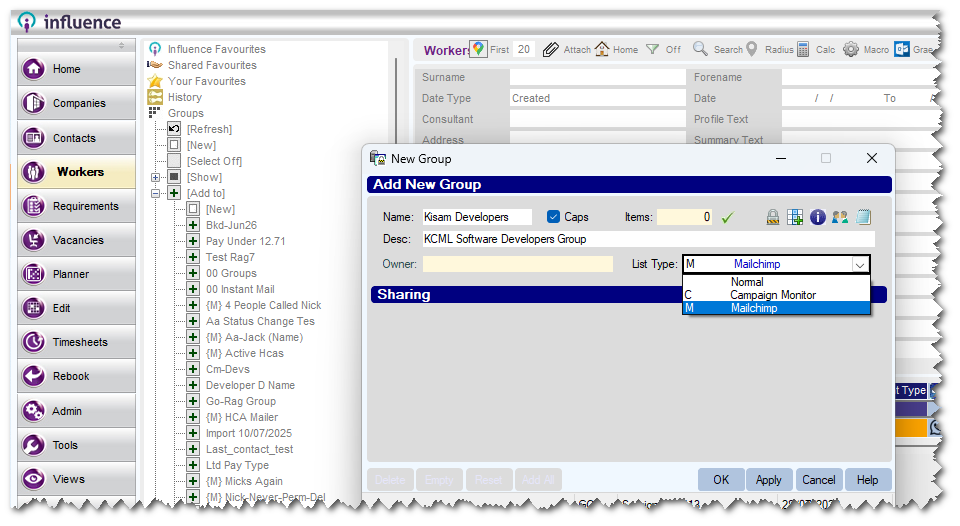
Mailchimp-linked Groups in your database are indicated with an {M}
Any new Candidates or Contacts added to a linked Group in Influence will be automatically sent to Mailchimp and assigned the correct Tag.
To use the new Mailchimp Integration, you will need :-
- A new or existing Mailchimp Account
- The Influence Mailchimp integration. (Please contact our Sales Team for more information)
You can find out more about our Mailchimp integration HERE
Show Additional Info for "Timesheet" contacts in Timesheet Entry
When using the Timesheet Confirmation option from within timesheet entry, it is now possible to show additional information for contacts. The contact drop-down can show details of
Phone, DDI, Mobile, Role and Importance.
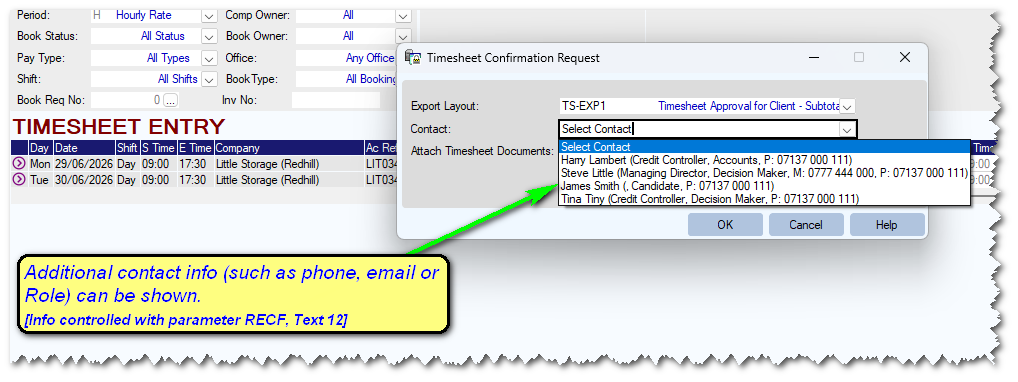
The new feature is controlled with parameter RECF, Text(12) to specify which additional info is required.
Irish "Stamp 2" student - restricted hours limit
A new feature has been introduced to help restrict the hours specifically for IRELAND (Eire). It relates to "Stamp 2" students.
These students are only allowed to work 20 Hours during 'Term' times, but 40 Hours outside this.
In Ireland these term times are strictly controlled. i.e. Students are restricted as follows
40 hours per week for all of June, July, August and September
40 hours per week 15 December - 15 Jan
20 hours per week otherwise.
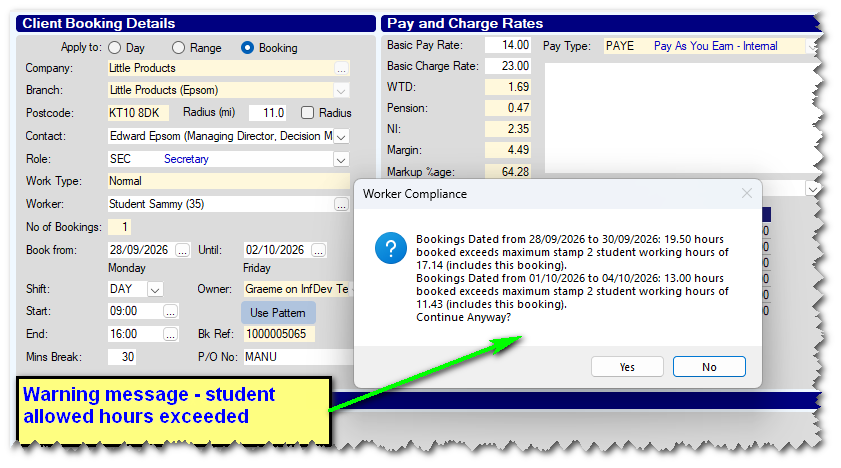
NOTE: When a week is "split" the hours are proportioned across the week - e.g. 28th Sep (Mon) -> 4th Oct (Sun)
During this week, there are 3 days at the 40Hr per week allowance, and 4 days at the 20Hr per week.
SO... They will be allowed to work for (40 x 3/7) + (20 x 4/7) Hrs, i.e. 28.57Hrs
The new feature is activated with parameter PAYROLL Flag 63 - Irish Visa Stamp 2 Rules for Students
Reference Chasing - New style to chase for references after original manual send
The Reference Chase feature has been enhanced to allow users to "Chase" referees after initially sending the first reference request manually.
The new feature to "Chase only" rather than actually 'sending; the initial chase, is available when setting up the chase. Just choose Manual Original
You can then setup various chase emails (Up to a maximum of 5) See below
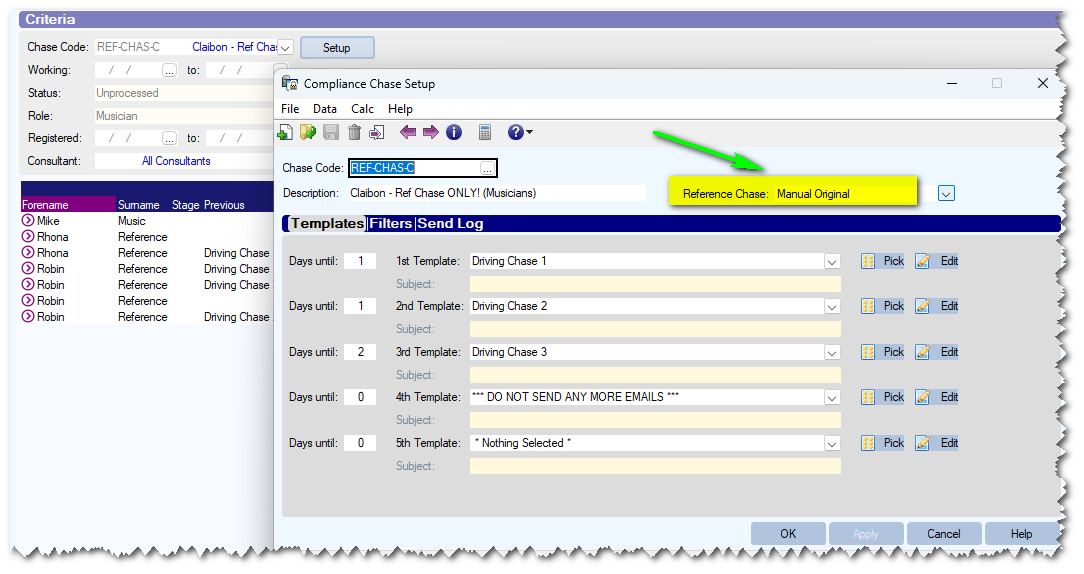
The new feature is only available if using the "Re-send original" style of reference chasing. (Activated with parameter COMPCHASE, FLAG(2) ). It can also check for a specific type of email being sent to the referee or 'any' email sent to the referee for the specific candidate (Specify the call type to check for using parameter COMPCHASE, TEXT(5) )
Close to AWR weeks warning when making a booking
A new feature has been added to allow a pop-up warning when making candidate bookings. It is possible to set a value for a number of weeks; any candidate whose AWR counter exceeds this will display a WARNING when you try to book them, unless their AWR counter has been ticked/marked as complete.
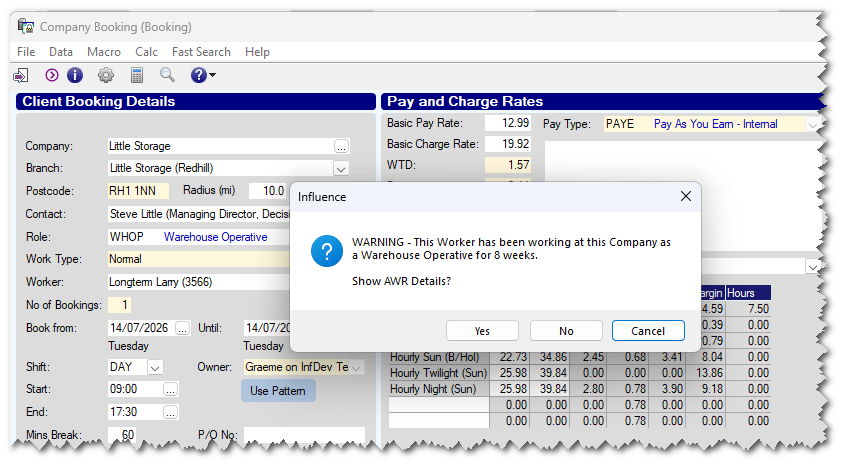
The idea is that the system will alert/remind users to tell workers of their Upcoming AWR rights before they get to that point. The feature is controlled with parameter TEMPS, Integer (18) - which holds the number of weeks for the warning
Improved organisation for IQUERY reports
Within the IQUERY reporting area some improvements have been made to help users find and organise reports;
i) Right-Click to add a report to personal [Favourites] folder
Users can right-click on a report name to add it to their own personal 'Favourites' folder.
This Favourites folder appears at the top of the Left-List.
ii) Reports can be added to a REPORT_GROUP folder
Within the Query Definition it is possible to assign a report to a REPORT GROUP. Reports can be assigned to one report group only.
These REPORT_GROUP folders appear for all users in the Left-List.
(NB The report will also appear under the relevant folder/file as it always did - as well as the REPROT_GROUP folder)
iii) Reports are sorted alphabetically by name within folders
IQ Reports are now sorted alphabetically by name within their relevant folder.
This makes it much easier to find by scrolling down the list of IQ reports, as long as you know the name of the report you are looking for.
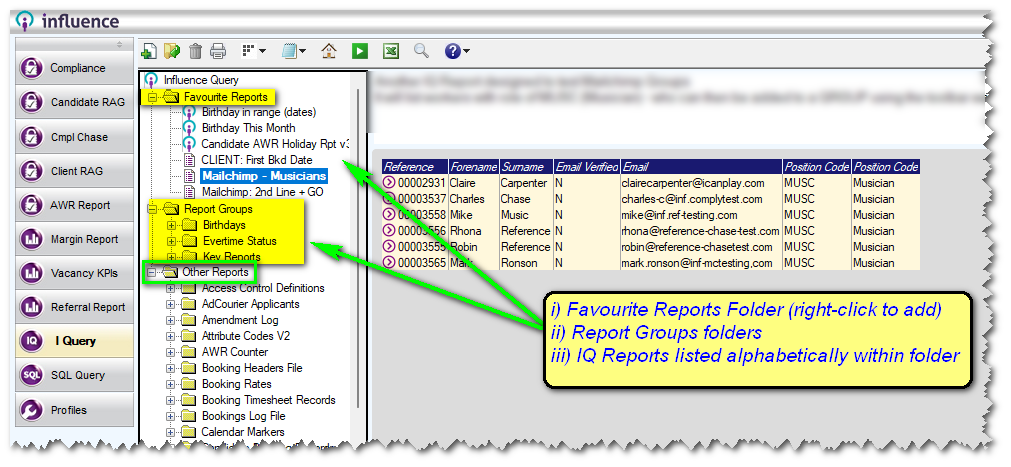
NOTE: All the normal folders for IQ reports are now listed/grouped under the Other Reports section in the left-list.
Find Vacancies with bookings in date range
A new feature has been added to allow users to search for Vacancies which have bookings in a selected date range.
The [Vacancies] workbench has a new Date Type filter; this allows users to search for vacancies where bookings Exist within a chosen date range.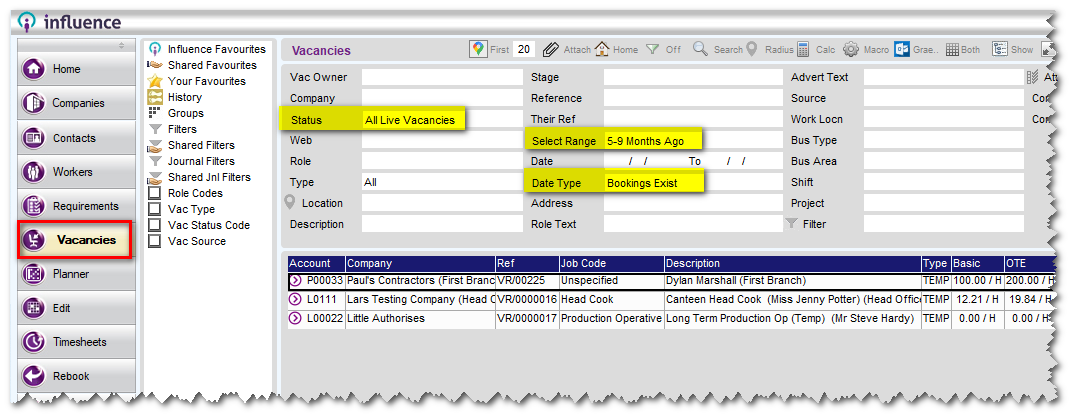
In the example above, the system lists any vacancies where there are bookings associated with the vacancy in the date range 5-9 months ago.
Miscellaneous/Internal Developments
- Amended the Reference chase module, so that templates to referees can now attach documents from the [Docs] tab of the candidate, using the merge field [[SPC_CAND_DOC_XX]] where XX represents the 'slot' on the candidate (1-10)
- (Optional) User Priority levels within User Profiles can now be set for 'Logging' and will write to the amendment Log.
Feature can be activated via data dictionary if required.
- Email sync (Drag & Drop, Mailbox scan & Outlook sync) now works with 'orphaned' contact records, i.e. those contacts in the database which have an email address, but are not linked to either a candidate or a client record (contacts such as Referees fall into this category). Any of these email sync methods will now find and identify the contacts and store the email as a Journal against that contact record. {New SYNC controlled with parameter JNLB, flag6 }
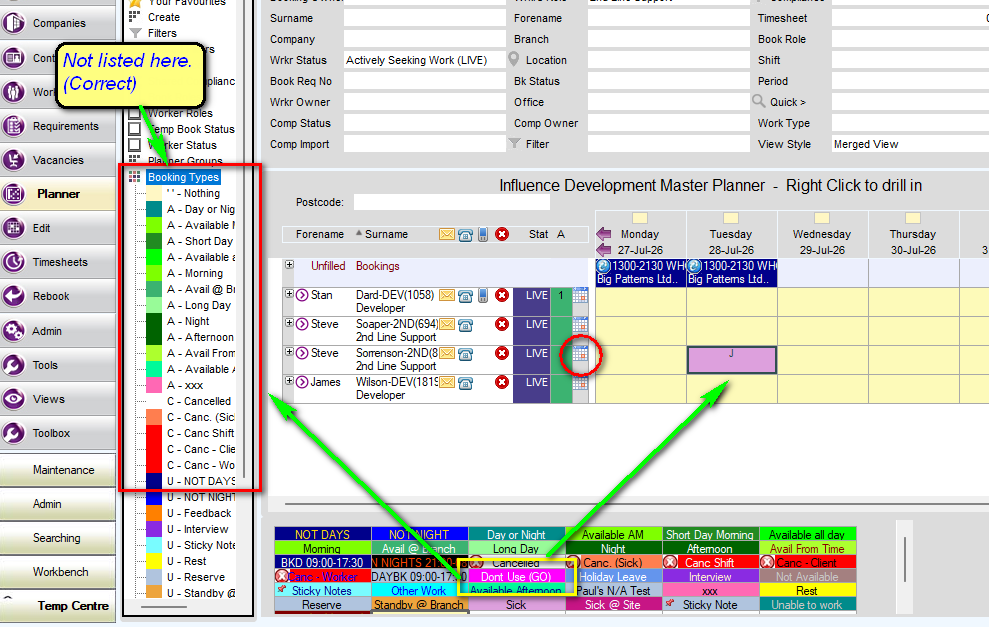
- Made a change the PLANNER
Booking Types in the palette below the planner which are "Push-through" types and create a Calendar Marker are no longer listed in the Booking_Types Left List - since they could never be searched in this way, which became confusing.
Bug Fixes
- Reversed a change to the way that Multiline 'booking' fields were processed. This change affected the "Booking Date" when using a 'Reverse' option to show the last date in a booking range.
The merge field [[MULTILINE=BOOKINGS;ONLINE;REVERSE]] - now works as it did in earlier versions.
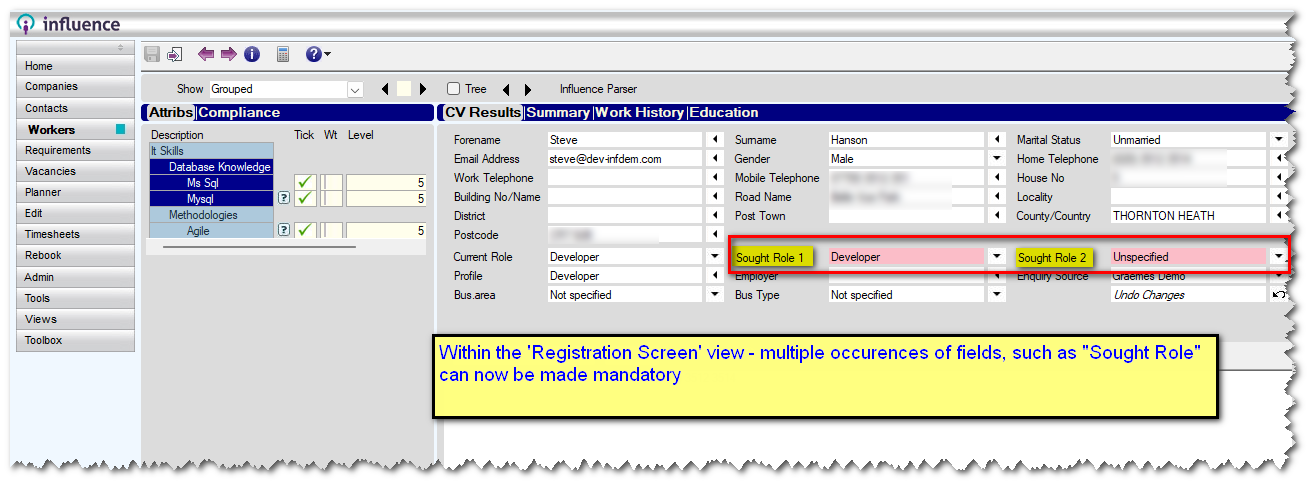
- When viewing candidates on the "Registration Screen" view, the system now shows multiple occurrences of a field IF the field has been made mandatory to occurrence X. e.g. If Job Role is mandatory to occurrence '2', then there will be two instances of the field "Sought Role" and both must be completed in order to save the record. See below
Release: Ver 1.00.26.156 (05/06/2026)
Features
Vacancy Search allows Mass send to "Un-Matched" workers
A new feature has been added to the candidate search from a Vacancy.
When you run the Candidate search from the [MATCH] tab of a vacancy, you will see a list showing workers who are already matched to the vacancy, as well as any 'New' workers who have been found by the search. It is now possible to pass over only the unmatched workers to the macro manager so they can be emailed about the Job.
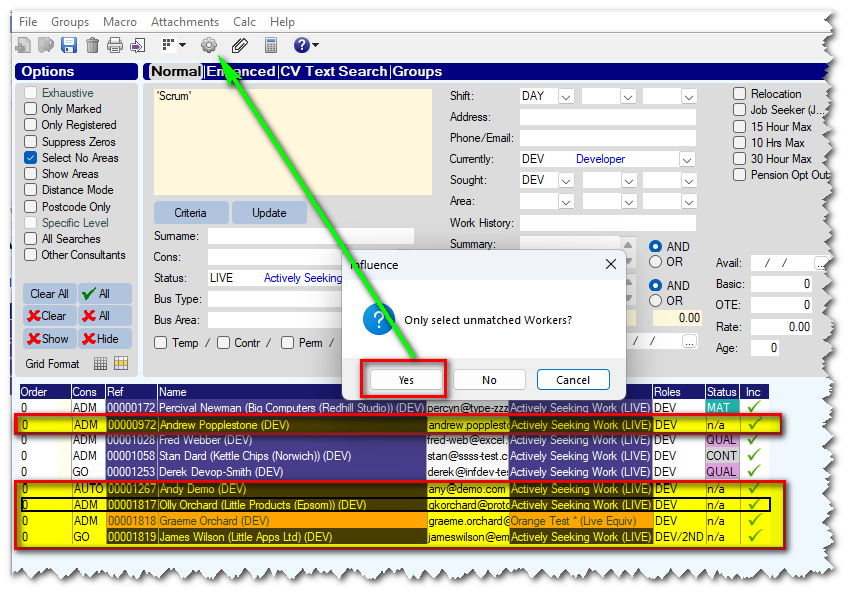
The new feature is activated with parameter REC Flag 60 - Vac Cand Search allow unmatched only for macro.
AWR Weeks Count (Proof)
A new feature has been added to allow user to easily see which specific 'Weeks' make up the AWR counter for a worker.
e.g. If their first booking was on a Wednesday, then their "Weeks" Run Wed->Tue.
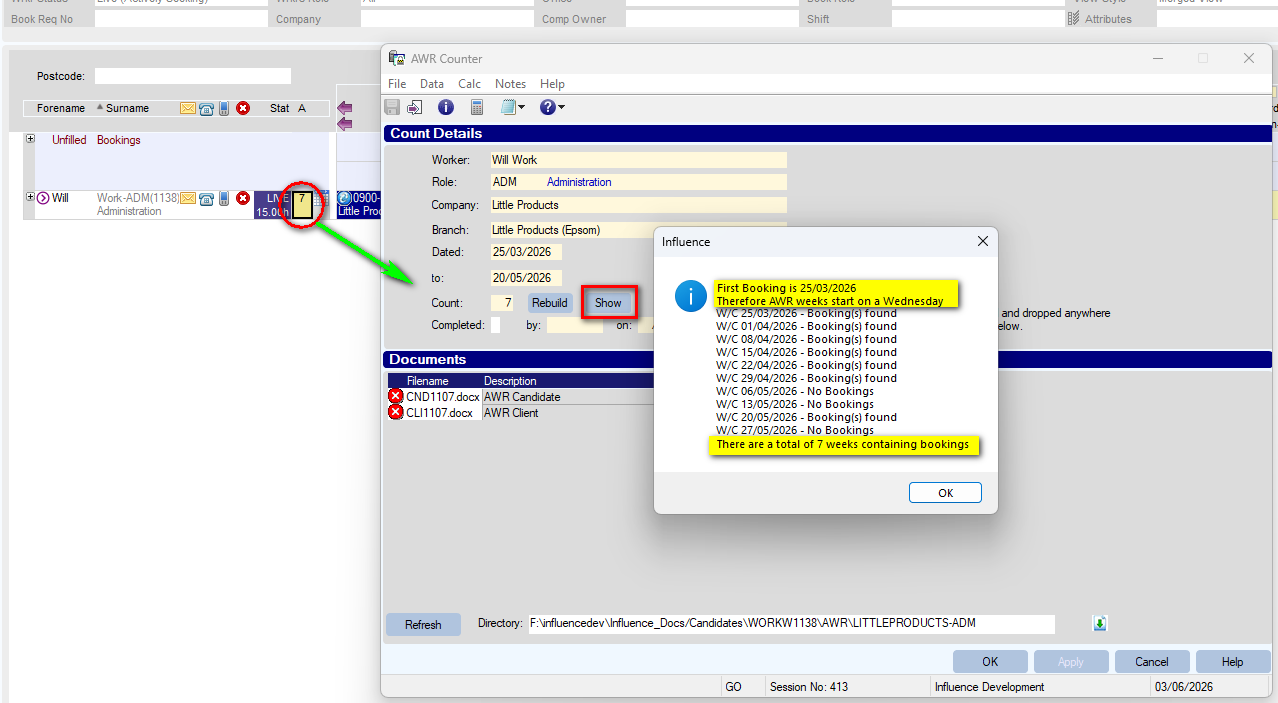
To use the feature, just click on any "AWR COUNT" item. Once the AWR Counter screen opens, click the [Show] button, and the system will show which 'weeks' have bookings.
Miscellaneous/Internal Developments
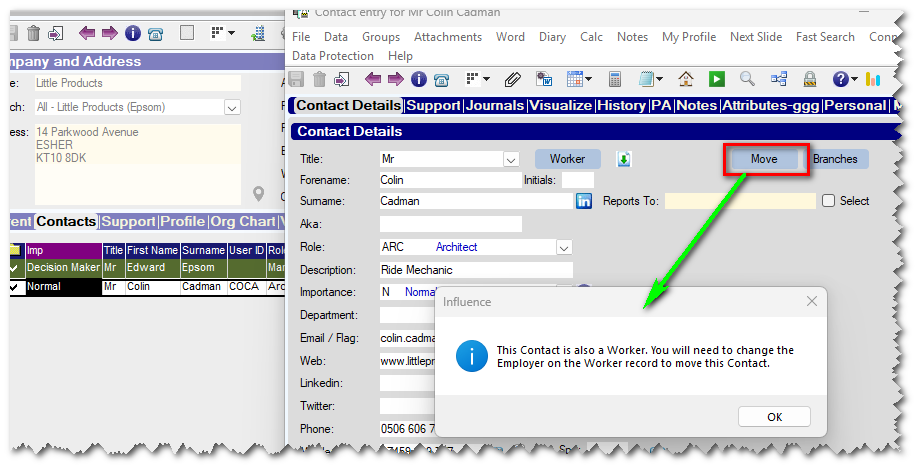
- When attempting to MOVE a contact who is also a candidate, the system now displays an appropriate message to tell the user to do this by amending the employer on the linked candidate record instead.
- Added a new MULTILINE parameter for VACONLY; When sending booking confirmations to workers from a TEMP vacancy, this ensures that the field will only show bookings from that one vacancy, rather than any/all vacancies where the temp might be booked this week.
e.g.
[[MULTILINE=BOOKINGS;VACONLY]]
[[ENIK_DATE]] [[ENIK_JOB_CODE$]] [[ENIK_START_TIME]] - [[ENIK_END_TIME]] ([[ENIK_DATE_11]]) Site: [[CMS_SITE_NAME$]] [[ENIK_BOOKING_ID]] Vac Ref: [[ENIV_GEN_REF$]] [[/MULTILINE]]
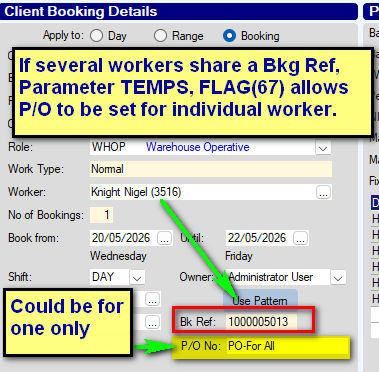
- Ability to have "Separate" P/Order numbers for each individual worker on the SAME booking.
A New parameter has been introduced to allow workers who share the same Booking, to have different P/O numbers.
e.g.
John Smith is a worker assigned to booking Ref 1000235. He has P/O number JS-0023
Mark Wright is also assigned to booking ref 1000235. He has P/O number MW-0038
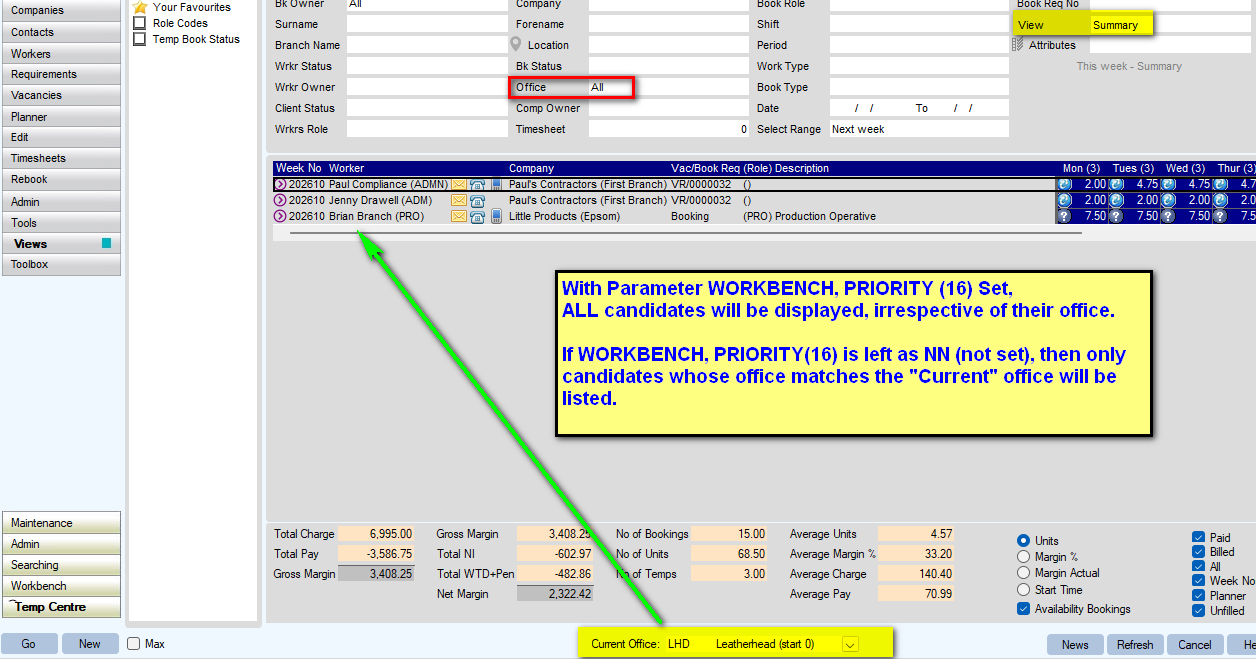
- Added a new parameter to allow "All Offices" when viewing the SUMMARY view of bookings.
When viewing the SUMMARY tab of bookings, if you are using a "Multi-Office" system, when selecting the option for "All Offices" this applied to the Bookings - however, the view still filtered the Candidates based upon the currently selected office at the bottom of the screen. The new parameter WORKBENCH, PRIORITY (16) can now be used to control this behaviour.
When set to NN, the system behaves 'as now' - but if set to a priority level (eg. 00 or 10 ) then for any user with a display priority higher that this, the system will ignore the current office, and will show ALL candidates, irrespective of current office.
- Additional controls for posting to TSP (Timesheet Portal)
For Influence systems posting contract placements to Timesheet Portal (TSP), there are a few new parameters, to control or prevent the posting of certain information.
| TSPORTAL, FLAG(30) Do not post Accounting Code for Client | Prevents Accounting code being posted for contracts/placements sent to TSP |
| TSPORTAL, Flag(31) Do not post Invoice Details for Client | Prevents Invoice details being posted for contracts/placements sent to TSP |
| TSPORTAL Flag(32) Do not post Limited/Umb Co Details for Cand | Prevents LTD Co. / Umbrella Co. details being posted for contracts/placements sent to TSP |
| TSPORTAL Flag(33) Do not post Bank Details for Cand | Prevents Bank Account details being posted for contracts/placements sent to TSP |
Bug Fixes
- Fixed an issue which prevented the "Days" field from being hidden at the top-right of a Vacancy screen. The field can now be hidden.
- Fixed an issue when setting the email address of a candidate/worker to <blank> to ensure that the associated Contact record (And X-Ref record) is kept in Sync.
- Single character 'Calendar Markers' from the planner did not always come through to Excel correctly when exporting the MASTER PLANNER to Excel. These calendar markers are now exported correctly.
Release: Ver 1.00.26.135 (15/05/2026)
Features
User Access Control (UAC) to allow/prevent access to [Add Worker] button
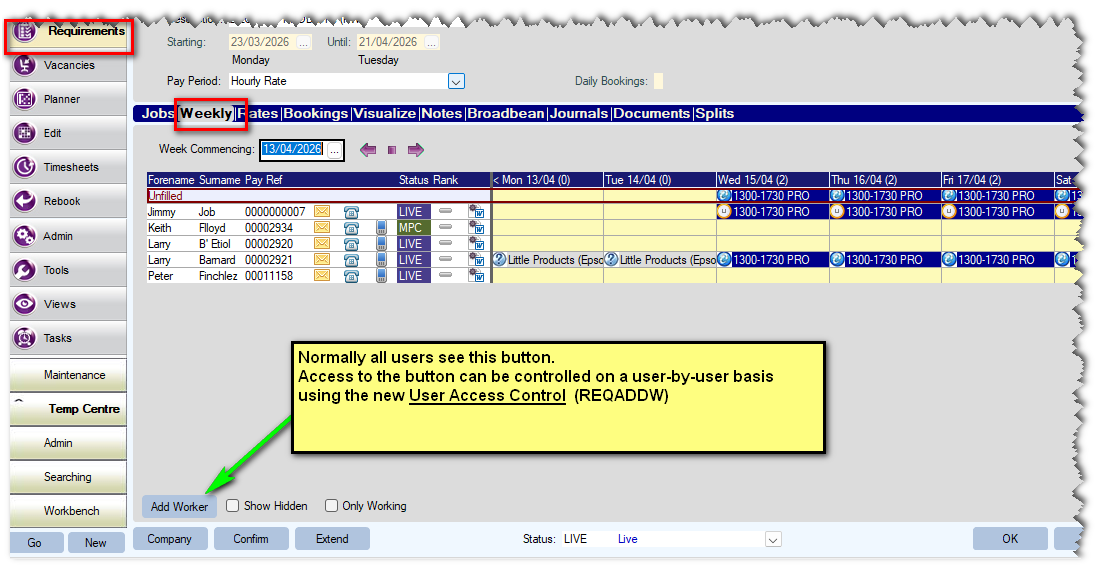
A new UAC control has been added to allow access to the [Add Worker] button seen at the bottom left of the [Weekly] tab within a Booking Requirement. (See below)
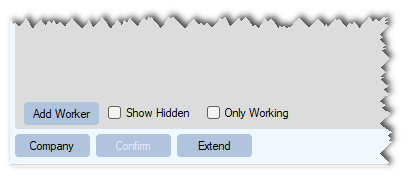
The new UAC code is REQADDW Once set, only users specified as "Full Access" within the control will be allowed to see/use this button within a Booking Requirement.
Users will either see (or not) the [Add Worker] button at the bottom left of the [Weekly] tab of a booking Requirement.
Filter Client bookings By SHIFT on [Booking] tab of client
A new filter has been added to the BOOKING tab of a client to allow bookings to be filtered based upon the SHIFT code that was used. Simply use the drop-down to select the relevant shift, and date range for the bookings you want to see.
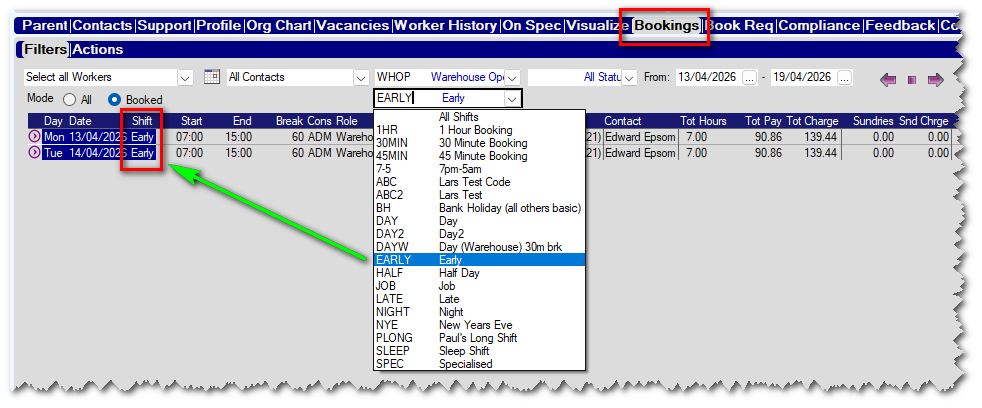
Any bookings made using the chosen shift within the selected date range (From/To) will be displayed.
Improved Logging for Macro/Mailshots if 'Create Journal' is unticked
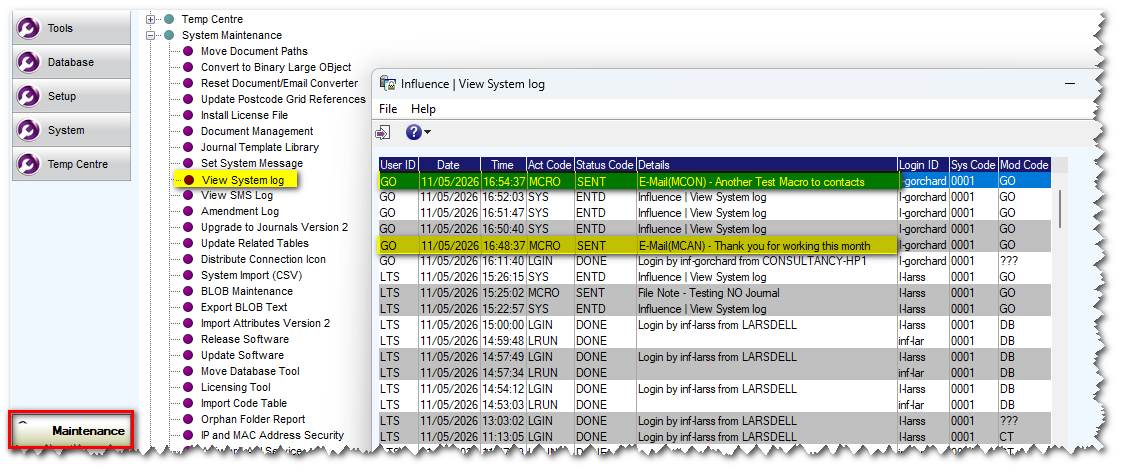
In this release if a user sends a mailshot via the Macro manager and chooses to untick the "Create Journal" option, a record is written to the system log. This proves the mailshot was sent - even though there may be no journals recorded in the system.
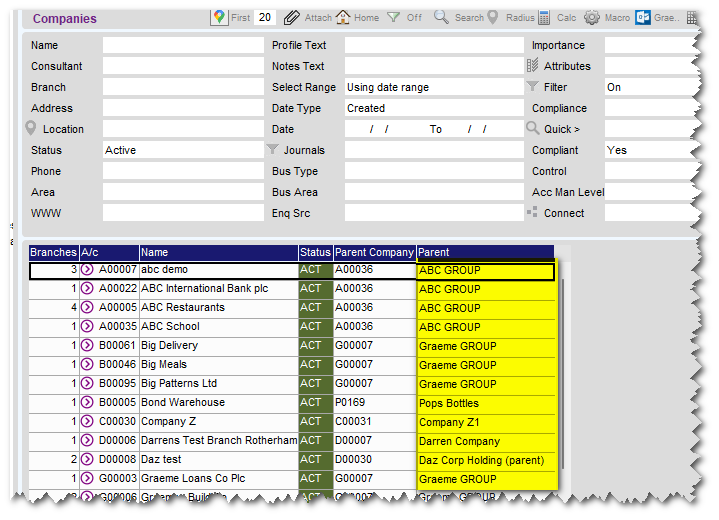
Display 'Parent' company name on [Company] workbench
In this release if using the Parent/Subsidiary function we have introduced the ability to show the name of the "Parent" on the workbench. There is a new field "Parent" which can be added to the display and will show the NAME of the parent organisation rather than just the A/C number.
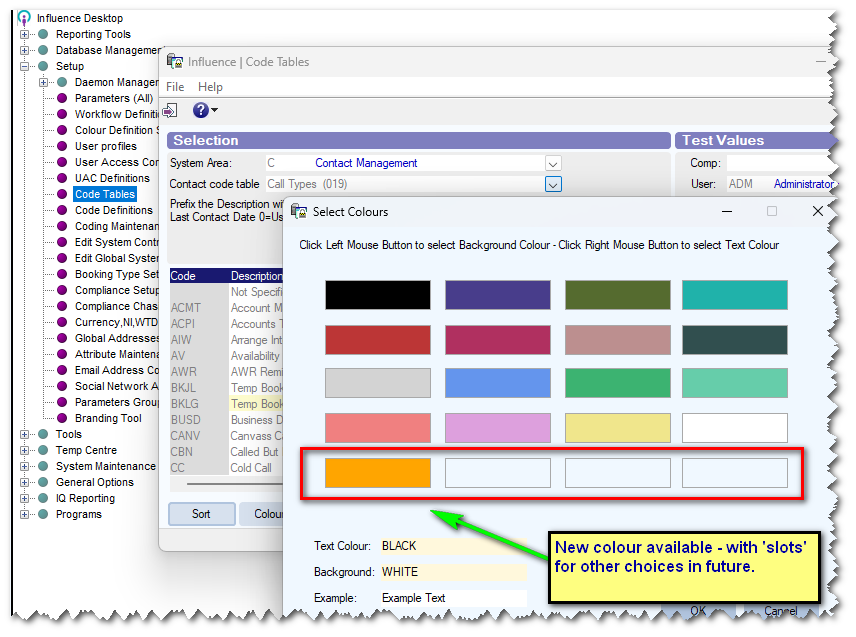
New colour choice (orange) for Code Tables (e.g. Candidate Status, Client Status, etc)
In this release, the choices of COLOURS available to CODES has been increased. A new ORANGE colour choice has been added as well as additional slots for future choices. (possibly).
Bank Account Number - Format Validation
It is now possible to validate the format of the BANK ACCOUNT field, and specifically restrict this to 8 numeric characters.
This affects the A/C number field seen on the Controls tab of a worker, on the 'Worker' tab of a placement, and on the 'Bank Details' tab of an umbrella company. See below - The system displays an on-screen warning if the format is not met.
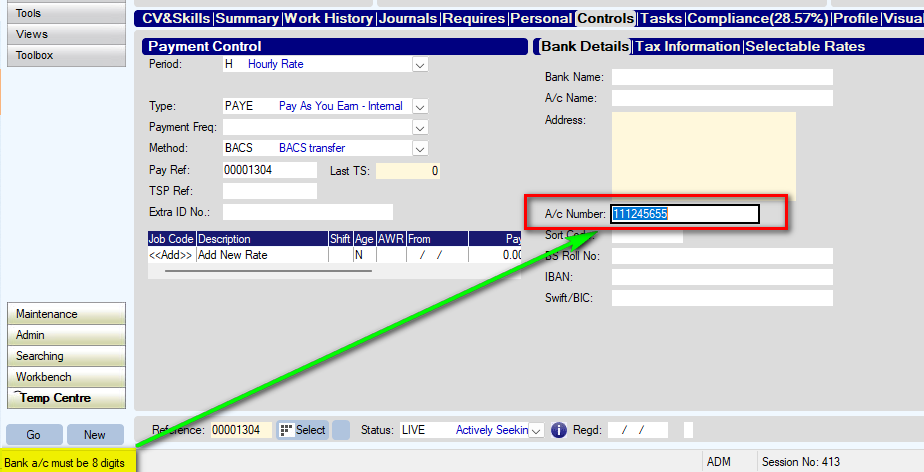
The new feature can be activated with parameter REC, Flag (59) (works in conjunction with RECE, flag(29) )
Miscellaneous/Internal Developments
- The DEFAULT FONT that is used when passing workers/contacts to the macro manager can now be set. Previously the system always used a windows default font of MS Sans Serif. You can now choose from Arial, Trebuchet, Times New Roman or Calibri
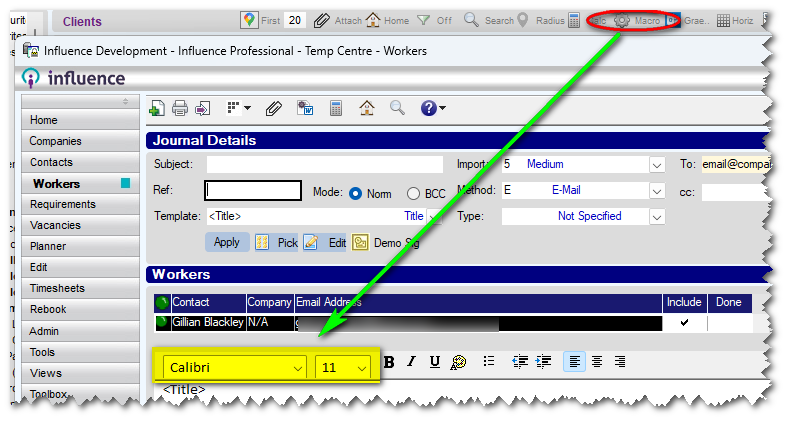
The default font can be set using two parameters;
JNL, Flag(16) - Default Font (DATRC)
JNL, Integer (12) - font Size ??
- When running a Compliance chase, compliance items which have been set as N/A (not applicable) are treated as being 'complete' and are not chased.
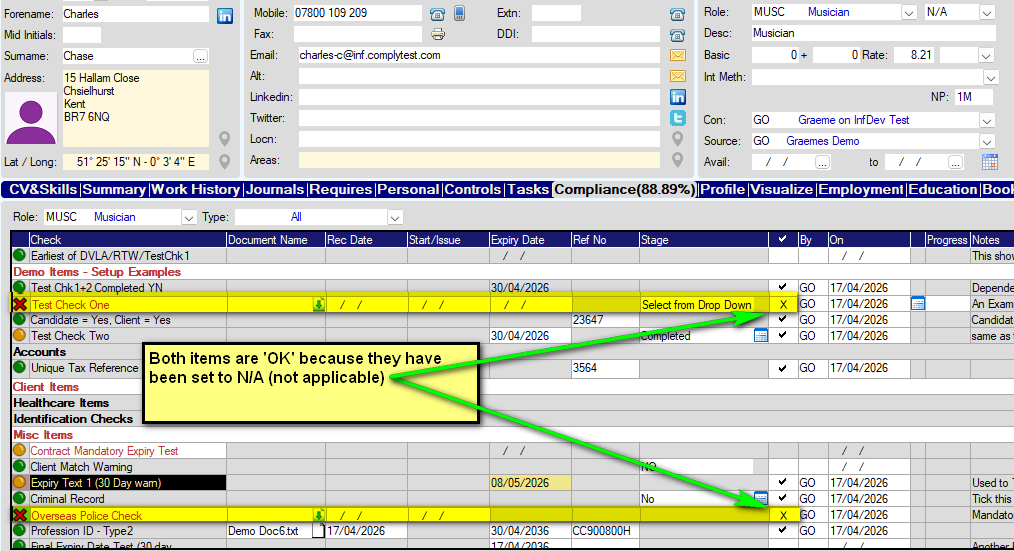
EXAMPLE
If you had setup a chase that was going to chase applicants for their "Overseas Police Check" then any candidate where the compliance item had been set as N/A (Not Applicable) by right-clicking the item, will NOT be chased for that item.
Setting the item as N/A effectively means that item is satisfied and does not require chasing.
- When using TIMESHEET PORTAL with Contract placements, the system now sends details of Commission Splits as part of the contract posting. (Previously contracts were posted, but any commissions splits were not sent to TSP as part of this.)
See below
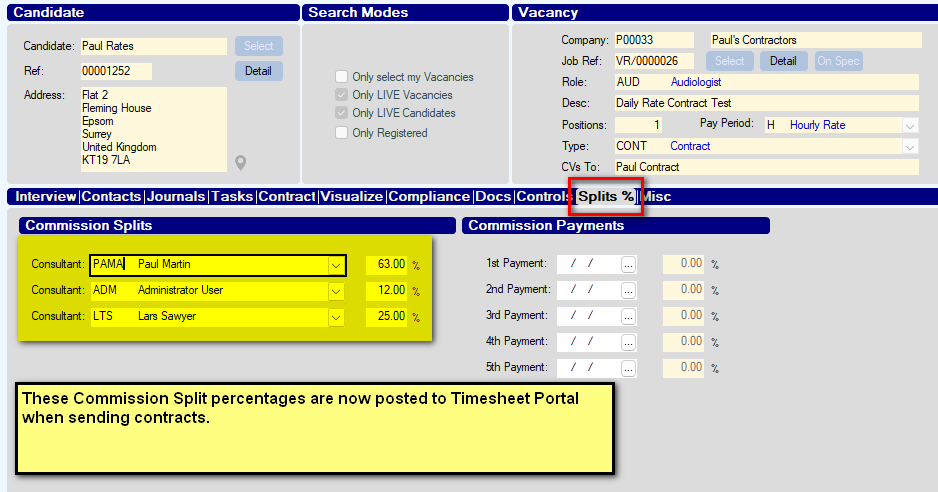
They can be seen against the relevant booking/placement within TSP.
- Made some minor adjustments to the CODE allowed for IQ report; Report codes now restricted to A-Z, 1-9, dahs or underscore. (Other characters such as $%/+ etc. are restricted to prevent problems.)
- Addressed issues when IMPORTING IQ reports if the IQ report already existed and was being replaced with a newer version of the same report. System now correctly imports und displays the most recent version of that report.
Bug Fixes
- Fixed an issue with automatic imports from Broadbean which could cause difficulties when searching for newly created applicants using their phone number. The option in Maintenance > Tools > Broadbean Candidate Import which runs automatically could create workers without writing to the Phone XREF file; this meant that searching for them by phone/mobile did not work; this has been corrected.
- Fixed an issue which could cause a crash when using the NEXT> button at the top of a client record, when switching past 100 records.
- Fixed an issue on the PLANNER within the Temp centre, which meant that searching for the complete company name when using the "Merged" view dies not return any info; this now searches and returns info as expected.
- Fixed an issue with bookings when merging contacts. The system will now correctly update all bookings when two (or more) contacts are MERGED. After the merge, all bookings will have the relevant unique_ID of the new, single (merged) contact.
- Fixed a minor display issue with TIME Formats in IQ Reports (HH:MM:SS, HH:MM:SS AM, HH:MM AM, HH:MM ) all formats now display as expected, using the selected format.
e.g. 09:15:PM is displayed when using HH:MM AM, whereas 21:15 is displayed when using HH:MM, etc.
- Fixed an Issue with Vacancy Searches; in certain circumstances a candidate search from the MATCH tab of a vacancy did not display/include all currently matched candidates. This is now resolved.
Release: Ver 1.00.26.091 (01/04/2026)
Features
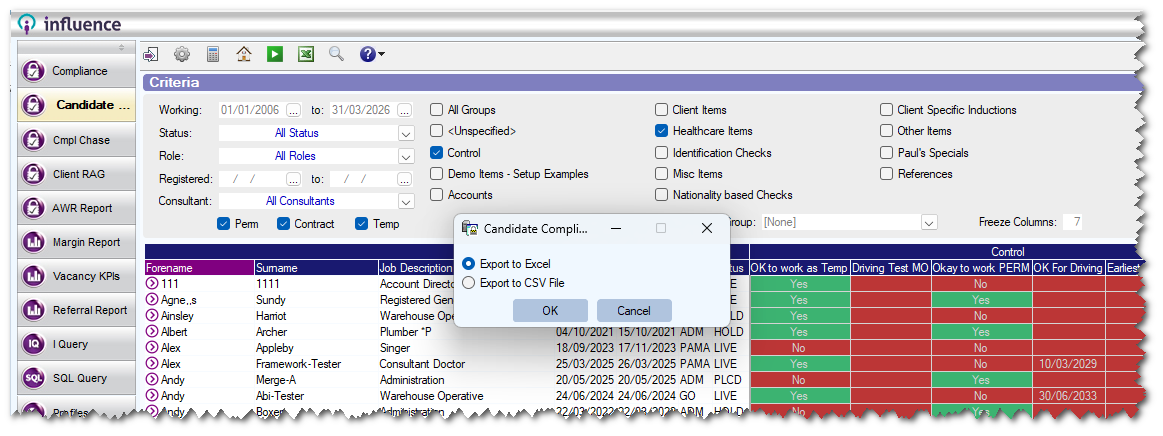
Candidate RAG report now allows export to either Excel <or> csv file
The candidate RAG report giving details of compliance, now allows users to choose whether to export to MS Excel, or to a csv file. The new choice is controlled with parameter RECC, Flag(54) and can be set to default to Excel, to csv, or to simply allow the user to choose.
Candidate Duplication list report - Additional info displayed.
The Candidate Duplication list, found in Maintenance > Reporting Tools > Standard Reports > Candidate Duplication List now shows additional information.
The report includes
REF, FORENAME, SURNAME, CREATED DATE, STATUS, CONS, EMAIL, MOBILE, TEL, ADDRESS, DOB, SEX, NATIONALITY, LAST JNL*
(*The Last Jnl field is only included if the "Check Last Jnl [ ]" option is selected when running the report. )
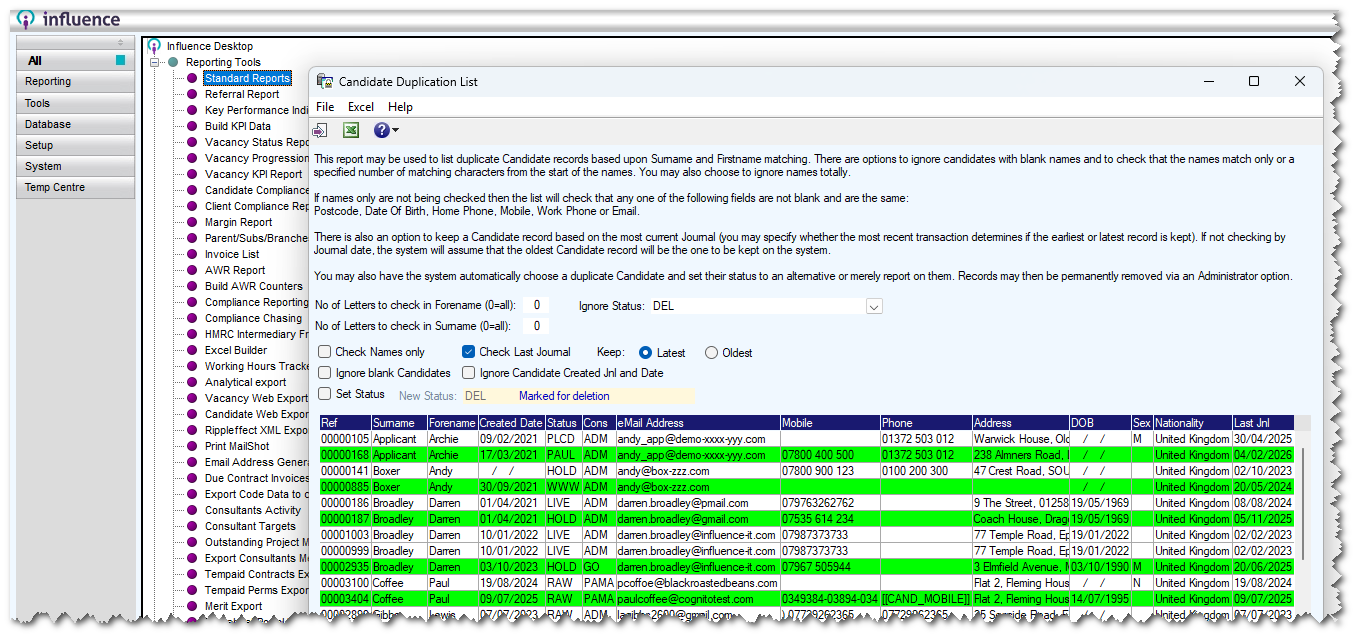
After the report has run, potential duplicates are listed in GREEN.
It is possible to drill-into candidate records to check more info by double-clicking the record in the grid.
The results can be exported to MS Excel using the excel icon in the toolbar (NB: A password is needed for this export.)
Miscellaneous/Internal Developments
- Improved the way the system handles re-applications from Broadbean. If a worker has previously applied (and been added to the Database) via Broadbean, and was then deleted, if they then re-apply the system will re-display the worker on the Broadbean Applicants tab, with the status of Reapplied

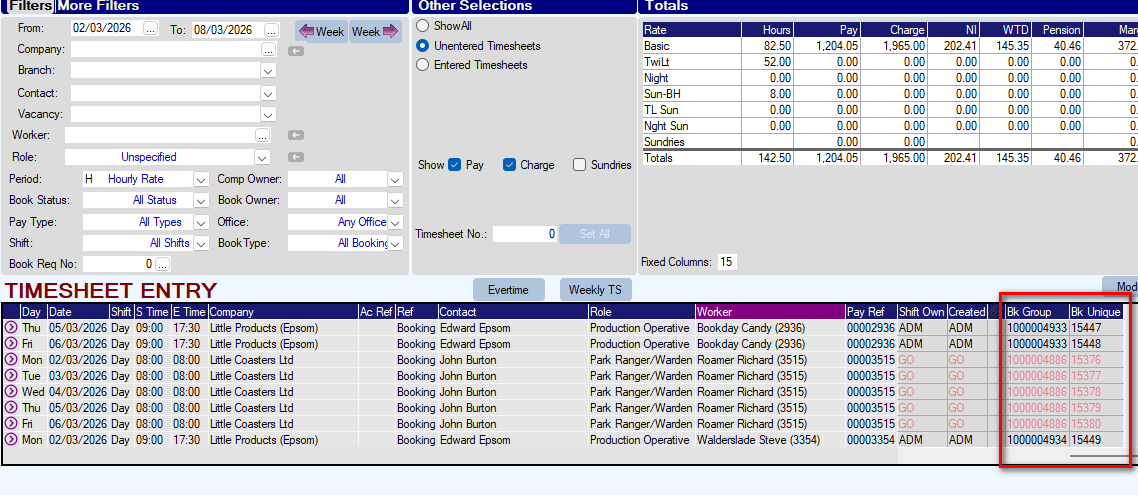
- Within TIMESHEET ENTRY it is now possible to display the Booking Group ID and Booking Unique ID at the right-hand end of the display. The new feature is activated with parameter TEMPS, Flag(65)
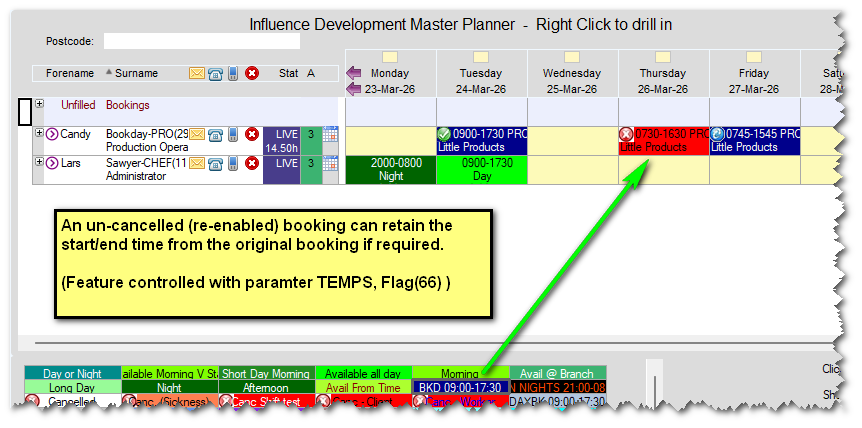
- Option for 'Un-cancelled' bookings to retain the start/end time from the original booking.
If a booking is added to the PLANNER, and then [Cancelled] using one of the option from the palette, the cancellation will show the times of the original booking (e.g. 07:45 - 15:45)
If the booking is subsequently re-enabled by clicking on-top of it with the [BKD] option, it is now possible to get the system to re-create the booking but retain the original times
New parameter TEMPS, Flag(66) is used to control this feature.
Within TIMESHEET ENTRY it is now possible to display the Booking Group ID and Booking Unique ID at the right-hand end of the display. The new feature is activated with parameter TEMPS, Flag(65)
Bug Fixes
- Fixed an issue which could cause the status of existing bookings with a status of TSE (Timesheet Entered) to change the CREQ (Confirmation Requested) - when extending and re-confirming a multi-week booking.
Also addressed an issue where bookings made for ZERO hours (e.g. 14:00-14:00) were not displayed when viewing them via [Bookings] tab of workers.
- Fixed an issue when selecting a client record by typing part of their name in the Booking Entry form, which could cause the system to check the address incorrectly (used as part of Evertime - Address validation. )
Release: Ver 1.00.26.044 (13/02/2026)
Features
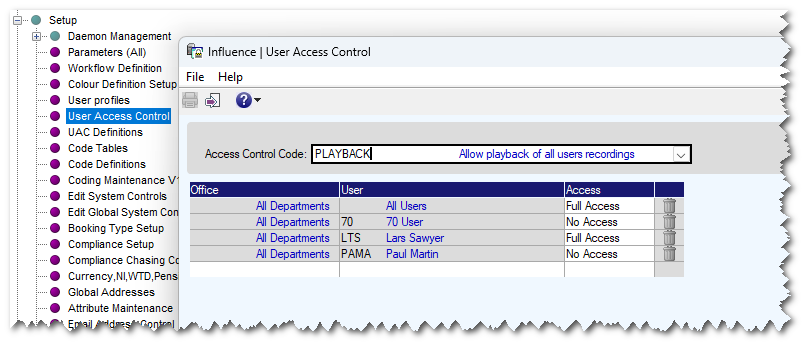
UAC for Call Playback control
For customers using Cloudcall as their telephony provider it is possible to make call recordings and playback these recorded calls from within the Journal in Influence.
It is now possible to control whether users are able to play "ALL" calls, or just those that were recorded by themselves. There is a new UAC (User Access Control) for PLAYBACK
Users can be added to the UAC with FULL ACCESS (To play back ALL recordings) or NO ACCESS (To Play back only their own recordings).
Contact Status can now be set as "Locked" (Same as Candidate/Client Statuses)
It is now possible to set a Contact status as a "Locked" status. (Code table Contact Status [451] )
What this means is that once a contact has been set to that status, it will require a Password to override the lock, and allow them to be moved to a different Status.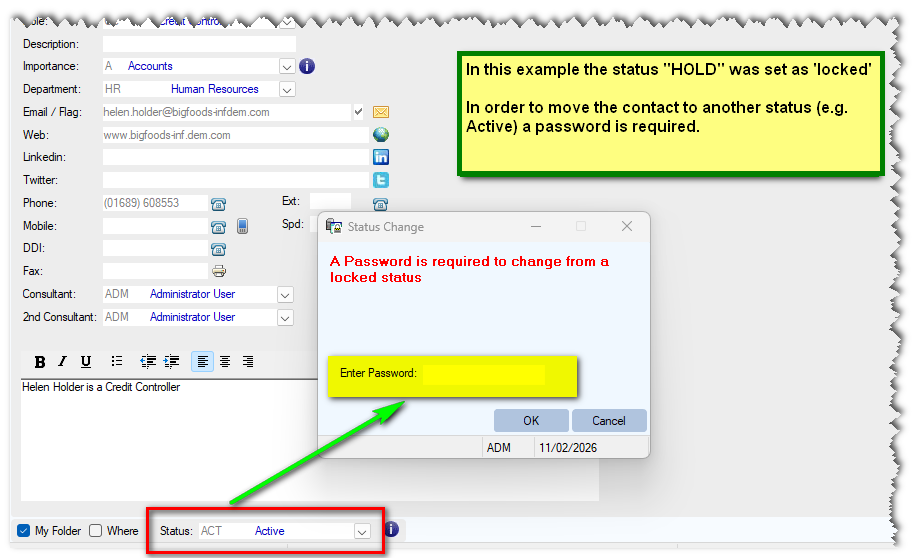
The Password to override is held in a parameter, and you can use a UAC (User Access List) instead of this parameter to set a specific LIST of users who are allowed to override, if required.
Select and Zip 'All' Compliance items
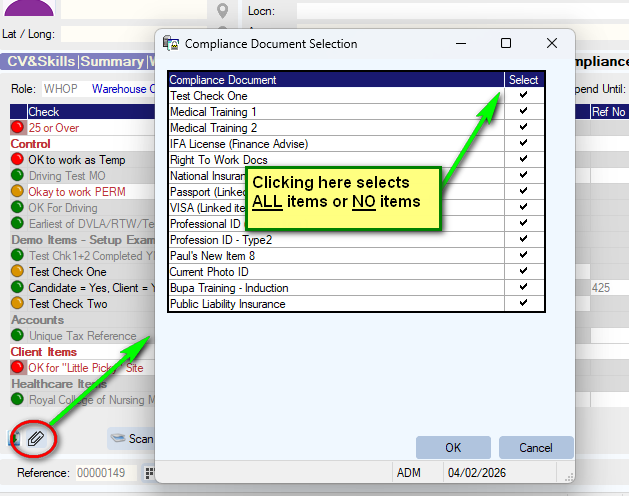
Clicking the paperclip at the bottom left of the worker [Compliance] tab allows users to select and Zip any of their compliance item documents. You can now select all or none very quickly, by clicking the column heading.
PLANNER can now show "Last Worked Date" as a hover-tip
From this release hovering over the worker surname on the planner will show the "Last booked Date" (prior to TODAY) for the worker. The feature is activated/deactivated with parameter PLANNER, Flag(9) - Show Last Worked.
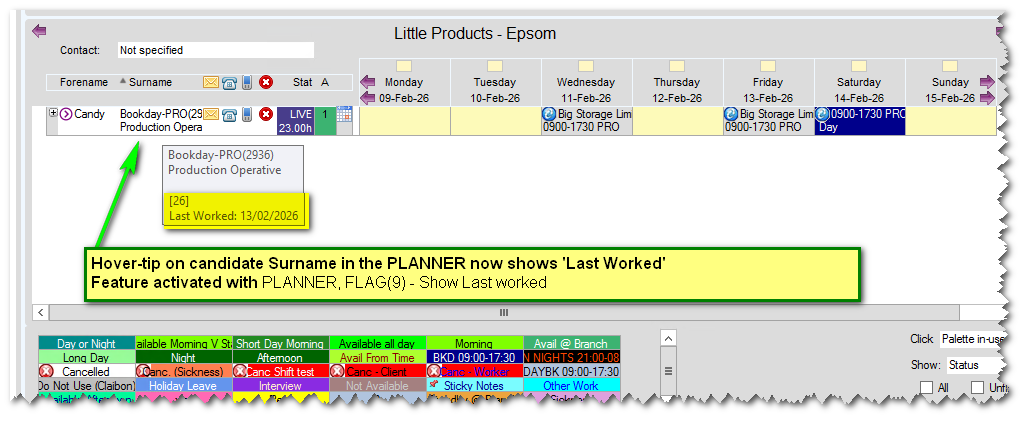 e.g. If the most recent booking for someone was 3 days prior to "Today" that would be the date shown, even if they had another (future dated) booking two days after "Today".
Ability to email candidates with details of non-responsive Referees
In this release, we have enhanced the Reference chasing. It is now possible to email candidates with details of any Referees recorded on their [Compliance] tab who have not yet returned their reference.
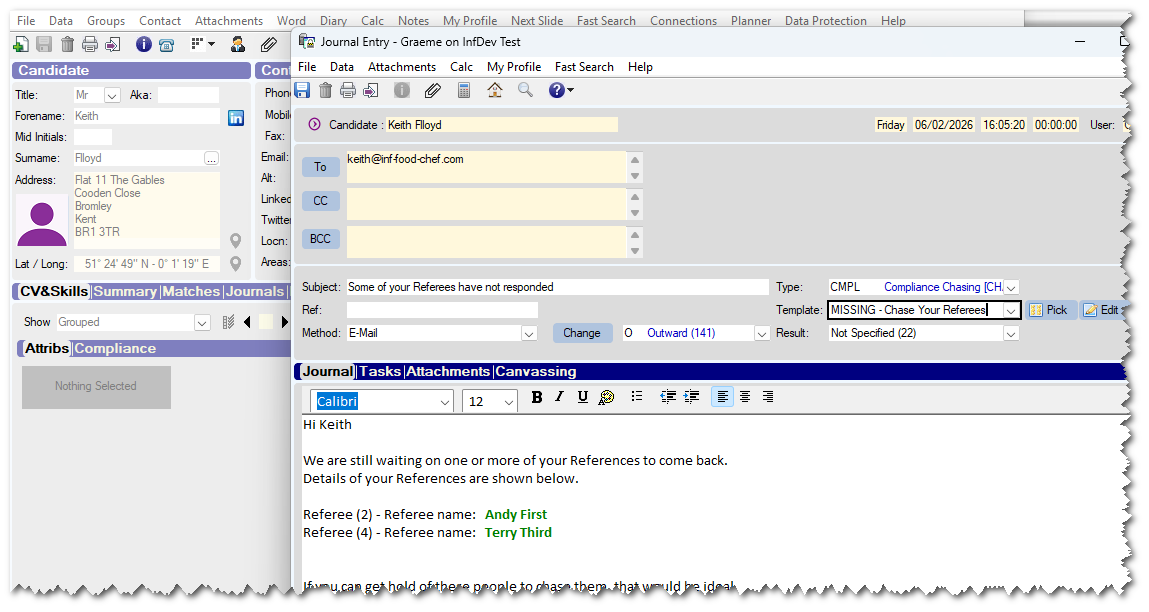
The email template can either be setup as a candidate email, or via the compliance Chase module so candidates can be 'chased' for their missing references (and hopefully 'nudge' their referees for you. )
| EXAMPLE TEMPLATE Hi [[ENID_FORENAME$]] We are still waiting on one or more of your References to come back. Details of your References are shown below. [[MULTILINE=COMPLIANCE;COMPLIANT=N;VALIDCODES=REF1,REF2,REF3,REF4]][[RQDF_DESC$]] - Referee name: [[CMC2_FORENAME$]] [[CMC2_SURNAME$]] [[/MULTILINE]] If you can get hold of these people to chase them, that would be ideal. -------------------------------------------------------------------------------------------------------------------------- NOTE : The Multiline field above may need to be different in your system, depending on the CODES used when the Compliance items for References were created. |
Ability to Sort bookings by "Candidate" - when sending Client confirmation emails
If you are sending a confirmation email to a client, listing all the workers they have had "This Week" or "Last Week", etc. It is now possible to sort the list of bookings into CANDIDATE Order. (Previously all bookings were listed Chronologically)
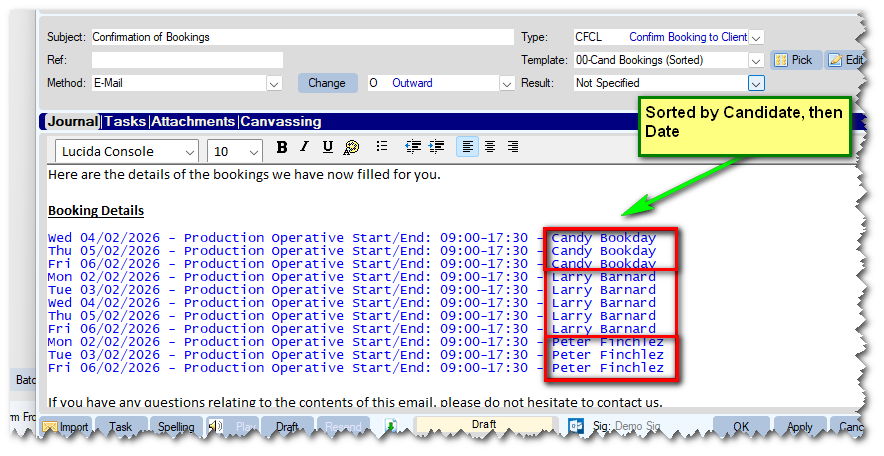 Bookings will be sorted/Grouped by Candidate, and then Chronologically for that candidate.
Easier to MOVE contacts or links them to a new "Branch"
When you open the record for a Contact, the [Move] button now has a hover-tip, explaining what it does.
The [Branches] button also has a hove-tip, and when clicked allows you to choose from other 'Branches' of this client.
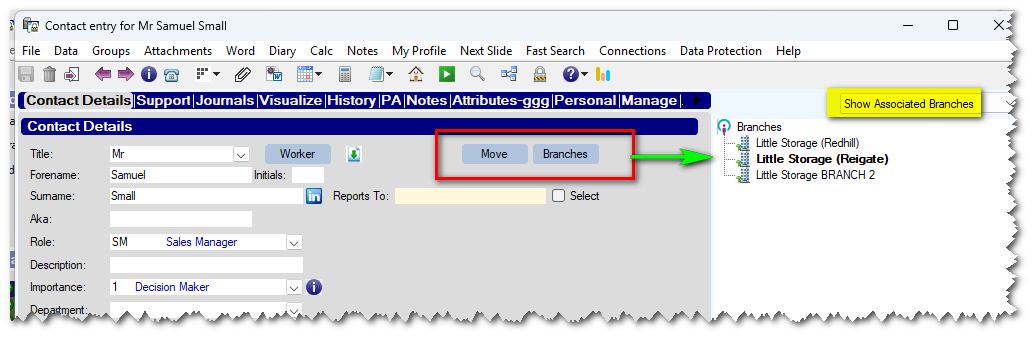
You can right-click on a branch to set this as their 'main' office, or BASE the contact at this office.
Miscellaneous/Internal Developments
- Change to Purchase Orders when posting to TSP (Timesheet Portal).
For customers using the TSP Portal integration, for customers making bookings that are linked to a TEMP Vacancy (as opposed to ad-hoc Bookings) it is now an option to always send the P/O Number to TSP from the VACANCY.
The feature can be enabled with parameter TSPORTAL, Flag(29) - Can be set to Y or W (N = not activated)
If set to W the system will WARN if a user tries to change the P/O Number (unless it was originally <blank>)
The P/O number can be seen/set on the [Controls] tab of the vacancy.
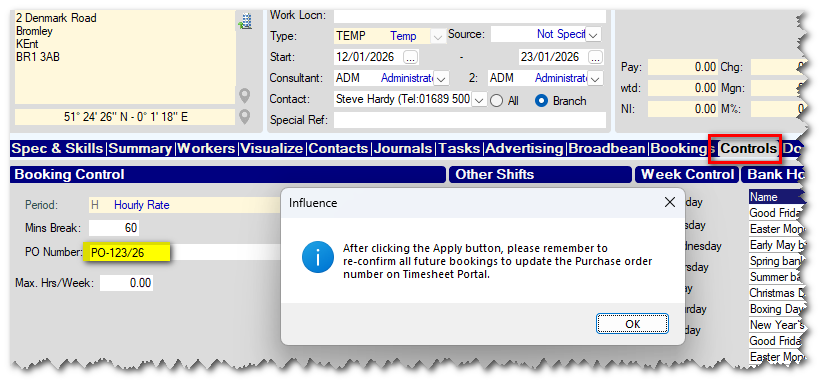
| This feature is useful when P/O Numbers change for longer bookings. Each time the client issues a new P/O number users should open the relevant (long term temp) vacancy, and amend the PO number held on the vacancy. If using this feature, please make sure all timesheets for the "Current" PO number have been exported/approved before changing the PO number on the vacancy and re-exporting (posting) the bookings to TSP. |
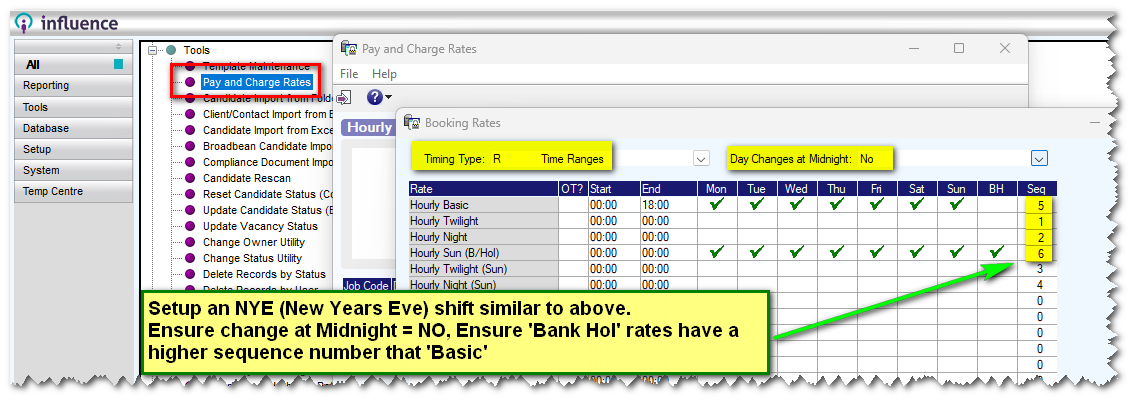
- Amended Global "Timed Rates" setup, so that it is now possible to specify if rates change at midnight (or not) on the Global setup. This allows for more flexible setup for shifts, such as the ability to pay "Bank Holiday" rate starting from 18:00 on 31st Dec (which is not a bank holiday) - Example of special "New Years Eve" shift setup is shown below.
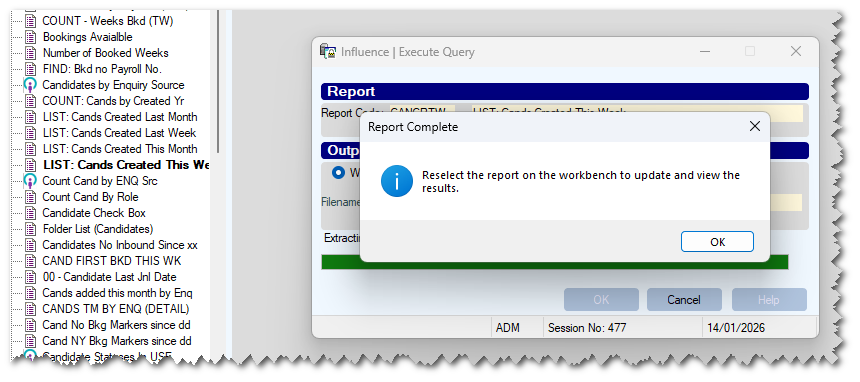
- Improved message when running IQ Reports. The system now explains that you must close the report and then reselect the report to see the new output. If the report is run to a 'local file' the system will automatically open the directory where the report was saved after it has finished running.
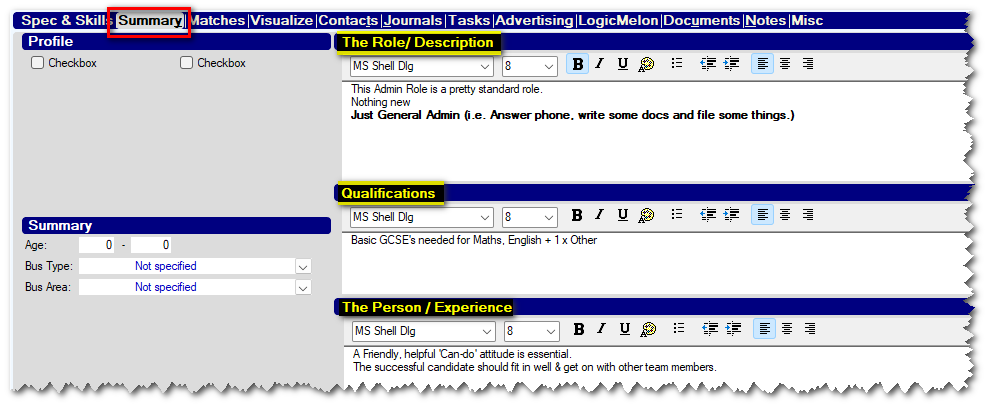
- Restored the ability to pull "Role" (Person or Quals) information from the old [Summary] tab of a Vacancy - if enabled.
This can now be pulled through to a Journal template using the older merge fields.
[[TXT_VACANCY_ROLE$]], [[TXT_VACANCY_PERSON$]] and [[TXT_VACANCY_QUALS$]]
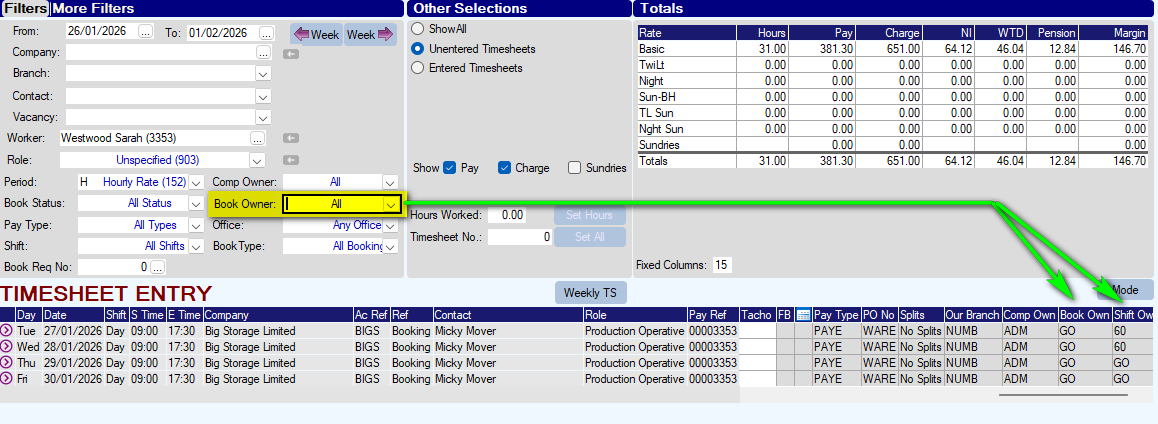
- Within the TIMESHEET ENTRY screen, there is a filter labelled "Booking Owner". This can now be controlled to look at either BOOKING OWNER <or> Shift Owner. The behaviour is controlled with parameter TEMPS, Flag(64)
- It is possible to setup the VACANCY record to show the CV&Skills tab, Summary Tab, or BOTH.
You can also decide which tab is used as the 'default' when opening a Vacancy (CV&Skill / Summary)
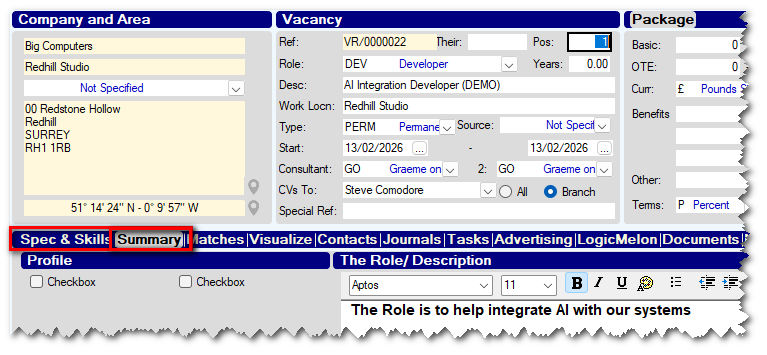
Parameter CODING, FLAG(23) is used to specify which tab is opened as the "Default"
- Ability to "Rename" candidate document attachments to include worker name. When using merge fields such as [[SPC_CAND_DOC_XX]] to attach a document from a particular "Slot" on the [Docs] tab of a candidate to an email template, it is now possible to get the system to rename the document, to include the candidate name.
e.g. If the document in slot-4 is called REFXXXXX.docx
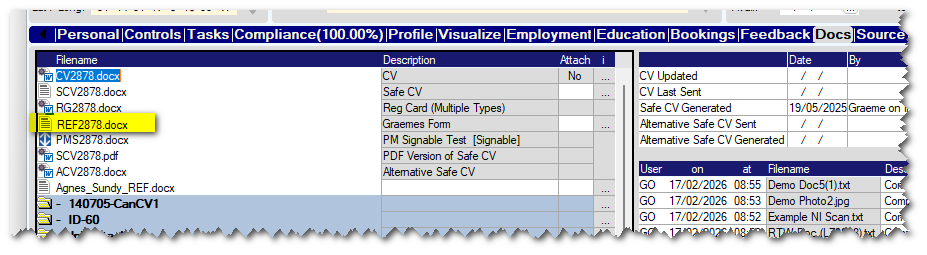
It can be attached to email templates as Forename_Surname_REF.docx
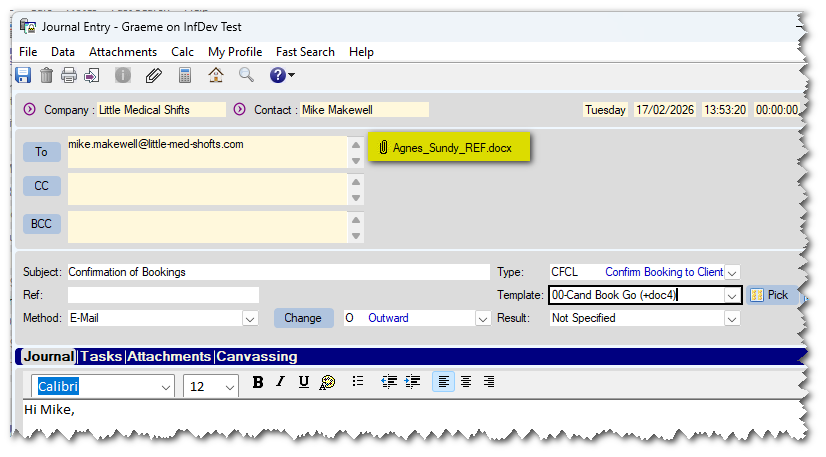
This can be controlled for each of the 10 "Slots" on the candidate [DOCS] tab, using parameters ENIGMACND, flag(21-30)
Setting these to "A" will 'nAme"each document as above.
Bug Fixes
- Fixed an issue that could cause a crash when importing a duplicate CV, if clicking on columns heading within the duplicate windows.
- Fixed an issue that could cause a CRASH on the [Compliance] tab of a candidate if clicking the heading of the "Tick" column, after switching to [Endorsements] and then back to [Compliance].
Was this article helpful?
That’s Great!
Thank you for your feedback
Sorry! We couldn't be helpful
Thank you for your feedback
Feedback sent
We appreciate your effort and will try to fix the article